Scrapers are DDOsing version fedoraproject applications.
We are working to mitigate things. Some endpoints may be unavailable as we work to mitigate the attack.


Scrapers are DDOsing version fedoraproject applications.
We are working to mitigate things. Some endpoints may be unavailable as we work to mitigate the attack.

For decades, the Linux virtual console has relied on the kernel fbcon driver, to draw the framebuffer, to manage fonts, and to handle keyboard layout. Starting with Fedora 45, we’re switching to a userspace utility called kmscon. Depending on your usage of virtual console, this may impact your workflow.
If you’re not a developer or a system administrator, chances you probably never heard about fbcon or virtual terminal (VT), in this case you’re probably not impacted.
You can still read the rest if you’re curious about minimal text interfaces, and maybe you’ll start using it.
Most of the graphic sessions runs in tty1 or tty2. So press Ctrl+Alt+F3 to switch to tty3, and you will get a login prompt. This is the virtual console we’re talking about. To go back to your graphic session, press Ctrl+Alt+F1 (or F2 or F7 depending on your desktop environment).
The legacy fbcon driver runs directly in the kernel space, and has significant drawbacks:
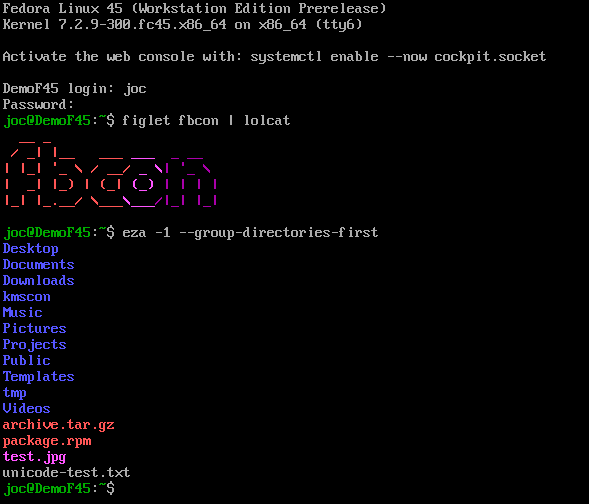
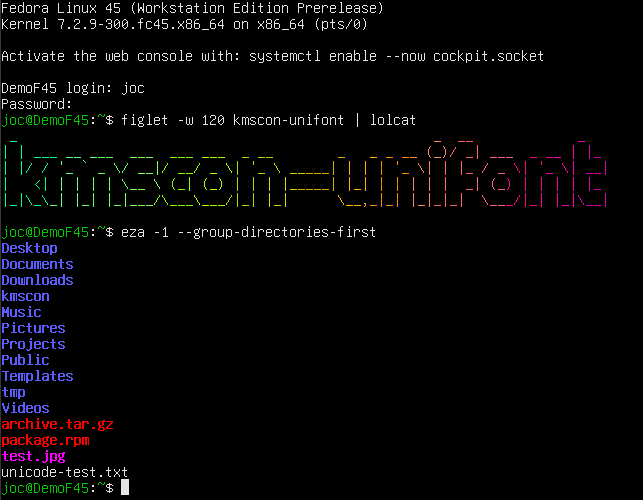

kmscon is split into multiple subpackages, so you have a minimal installation without graphic/font dependencies for servers, and optional packages for more features.
The configuration file for kmscon is /etc/kmscon/kmscon.conf
you can copy the example with this command:
sudo cp /etc/kmscon/kmscon.conf.example /etc/kmscon/kmscon.conf
Here are the most common options to change:
verbose: enable more logs, if you have issues with kmscon. To get the logs, use
journalctl -u kmsconvt*
font-engine: defaults to freetype (if available) or unifont (fallback). You can also use pango, or psf (the format used by the kernel fonts)
font-name: The name of the font (for pango, freetype, and psf). As kmscon runs as root, the font must be installed in /usr/share/fonts, not in your home directory. You can find the exact name to use with fc-list. You can install Cascadia fonts, that are good for non-latin languages with
sudo dnf install cascadia-fonts-all
If you want fancy icons, Nerd fonts are good, but not available in the default Fedora repository. For psf font, font-name is the path to the font file.
font-size: The font height in pixels. By default kmscon tries to scale the font to have about 120×40 characters.
multi-monitor: multi-monitor configuration, the terminal is the same on all monitor. The default is scaled which will scale the font to avoid too much black border. Other options are clone, which will center the terminal on each monitor, and largest which will only use the largest monitor.
dpms-timeout: The timeout (in second) after which the monitor will be turned off. default to 600 (10 minutes). 0 means disabled.
no-mouse: This disable the mouse support. It can be useful to disable touchpad on some laptops.
palette: Change the default color palette for your terminal. You can define each color if none of the provided default palette suits you.
We hope you will enjoy using kmscon in Fedora 45. You may use it occasionally, or use it as your main session for some specific usage, like Veronica Explains for a writerdeck https://www.youtube.com/watch?v=E7vFdy4BEAY.
If you encounter any bugs, have feature ideas, or want to contribute to development, the upstream repository is at https://github.com/kmscon/kmscon.
 admin )
on 2026-10-16 16:06:49 UTC
admin )
on 2026-10-16 16:06:49 UTC

Fedora Linux 45 is almost here! Developers, packagers, and quality assurance engineers are hard at work putting the remaining polish on Fedora 45, which means it’s time for our Global Virtual Release Party! It is almost time to celebrate! If all goes according to plan, we will celebrate Fedora 45 just after its actual final release.
To mark the occasion, we are hosting the Fedora Linux 45 Virtual Release Party on Friday, October 30, 2026.
Regardless of the final calendar date of any Fedora Linux release, every release represents months of hard work, testing, and collaboration from our global community. Whether you are a long-time package maintainer, a dedicated documentation writer, a creative graphic artist, or a brand-new user, this release belongs to you.
Join us for a half-day of live sessions, recorded deep-dives, and community socialization. We’re busy filling the upcoming schedule with updates from the Fedora Project Leader and behind-the-scenes looks at new features.
The event is 100% free and open to everyone, but registration is required to access the virtual venue. We will continue using Element, our chat communication platform, as the virtual venue for the Global Virtual Release Parties. Thanks Element & Matrix.org for providing us the great tools to bring our global community together!
 Register for the Fedora Linux 45 Release Party live event on Matrix!
Don’t miss out on the chance to connect with the people who build Fedora. Grab your ticket, share the link with your friends, and get ready to celebrate Fedora Linux 45.
 jflory7 )
on 2026-10-13 08:00:00 UTC
jflory7 )
on 2026-10-13 08:00:00 UTC
No single person can know everything happening in Fedora at any given time. I say this often in our community, half as a warning and half for comfort. For a while, I did not really believe it applied to me. I wanted to know everything. I joined new teams, participated in tickets, and either participated or led meetings across the project. Surprisingly, as a young university student, I held a vast amount of it in my head.
But Fedora does not stand still long enough for that to last. Eventually, I was spread thin across more teams than I could realistically track. As my academic load increased or I began an internship, promises I made quietly fell off my radar. It was not because I did not care. It was because the systems I used to track them could not keep up with the sprawl, when my available time to contribute changed.
However, as I reentered the Fedora community as a Red Hat employee, the same systems I used as a student were challenged. As I get going with my new role, I am rethinking how I can rebalance my bandwidth sustainably. So, this post is about how I started managing multiple Git repos with AI agents to claw back some of that bandwidth. It is not really a story about a remarkable tool. It is an argument that in a project this sprawling, protecting your attention is the real win. I will cover two moments when things fell through the cracks, the workflow I built to catch them, a real example of it working, and an honest take on trusting AI when it sometimes gets things wrong.
Fedora is sprawling. Fedora’s distribution Git (dist-git), the home for package sources, holds something like 20,000 packages. Add the team and SIG repositories that coordinate the people behind those packages on Fedora Forge, and the number of places where decisions get made is enormous. Yet, most contributors only touch a handful of them. However, even a handful is often scattered across different platforms, with no single view of all of it.
Before this workflow, it felt like pure chaos, and I have the scars to prove it. Fedora runs on mailing lists, Fedora Discussion topics, Matrix chat rooms, and Fedora Forge issues/tickets. Furthermore, all of these are spread across dozens of teams, Working Groups (WGs), and Special Interest Groups (SIGs). In short, there are a lot of different places to follow a lot of different things.
For a long stretch, the Fedora Marketing Team had a backlog of tickets. In a few cases, contributors asked for talks and presentations to be uploaded to the Fedora YouTube channel. I had the access to do it and other YouTube maintainers were no longer active, so therefore, it was quietly mine to own. I saw the tickets at least once, but I was overworked and busy with higher-priority work. The YouTube videos slid off my list. A new volunteer eventually picked them up months or even a year later.
Additionally, Fedora also runs meetings well… on paper. Fedora holds virtual text meetings in Matrix chat rooms with a bot that logs everything. Each meeting has a clear start, a clear end, and annotated topics. But a faithful log is not the same as follow-through. For example, in AI/ML SIG meetings, we discuss a decision or someone takes an action item, and it gets logged. But it does not always make it back into the relevant ticket or discussion post. The record exists, but it does not connect itself to the places that need updating.
Patterns like this repeat themselves. The examples above are merely specific examples of where things fall through the cracks. However, there are things like this that happen everyday in different corners of the community too.
So, here is the workflow I use now. It does not get rid of all the chaos, but it helps me manage it much better. First, I point an LLM-gen-AI agent at a directory holding several cloned Git repositories. For example, the AI/ML SIG docs repository, AI/ML SIG tickets repository, and Agent Skills library. Then I ask it to analyze across all of them.
I also feed it meeting logs or summaries. I ask it to cross-check them against open tickets and Fedora Discussion topics:
Did we document the decisions?
Did we track the action items?
Is anyone still waiting on a reply?
Critically, I do not want it reading only files from my local git clones.
I want it to query the remotes too: the Fedora Forge API, issues, discussions, and more.
The underlying Forgejo API is enormous.
It lets the agent track the actual cadence a team works at, not just a snapshot.
I have to be honest here: the agent sometimes gets things wrong. It will occasionally misread a thread or hallucinate a detail. However, I do not think that disqualifies it. Humans get things wrong too. I would rather have slightly imperfect visibility into tens, hundreds, or even thousands of repositories than none at all. Ultimately, the question is not whether the agent is ever wrong. The question is what level of risk you are willing to accept for the visibility you gain.
Our Fedora Agent Skills Library needed reviewer guidelines.
Laura Barcziová (@lbarczio), on our reviewer team, wrote a solid REVIEWING.md in the ai-ml/skills-library repo.
But our separate ai-ml/docs repository only had a page on creating a skill, and nothing on reviewing one.
I used an agent in OpenCode to pull discussion context from Fedora Forge issues about our reviewer process. It helped me reconcile that context with Laura’s draft. Then I orchestrated multiple Pull Requests across the repositories at once. This brought the AI/ML SIG docs site in line with what the team had actually decided.
In conclusion, the payoff is that it hands me back the capacity to zoom out. In a project where nobody can hold it all in their head, something should watch dozens of repositories. It surfaces what changed and what needs to catch up. That means I can engage with people’s feedback instead of just surviving the volume of it. When someone takes the time to review my Pull Request, I want the bandwidth to genuinely consider what they said. I do not want to just clear my queue.
I hope this overview of my flow and process is insightful. As of yet, I do not have a commenting feature on my blog, although I am looking into this. Tag me in a LinkedIn post and we can continue the conversation there.
Original photo by DM David on Unsplash. Modified by Justin Wheeler. Modified cover photo exclusively distributed under CC BY-SA 4.0.
admin )
on 2026-10-07 16:25:50 UTC

The Podman and Fedora Quality teams are organizing a test week from Monday, October 12, through Sunday, October 18, 2026. We want your help testing conmon v3, the Rust-based container monitor used with Podman. If you use Podman, try the same containers and commands with conmon v3 and report any differences.
Conmon is the small process that keeps watching a container after the Podman command that started it has finished. Podman uses an OCI runtime such as crun or runc to start the container; conmon attaches to its input and output, provides the connection for podman attach, collects logs, and records its exit status.
Conmon v3 replaces the C implementation with a Rust version. This helps prevent common memory errors in safe code. It also gives the logging backends a shared interface, making them easier to extend and test.
We already run Podman’s system tests against conmon v3. Now we’d like help checking development containers, interactive sessions, and Quadlet services on other people’s setups.
We’ve prepared a test week wiki page with setup instructions, links to the test cases, and information on reporting results. Start there to check the Fedora and package requirements, then use a test machine or VM with no important data.
Install the new monitor with this command:
sudo dnf install conmon-v3
To select it system-wide, create /etc/containers/containers.conf.d/99-conmon-v3.conf with the following content:
 [engine]
 conmon_path = ["/usr/bin/conmon-v3"]
Run podman info and check that the conmon path is /usr/bin/conmon-v3 and its version starts with 3. If you use both rootless and rootful Podman, check sudo podman info as well. User configuration can override the system setting.
Start new test containers after making this change. Containers that are already running retain their existing monitor.
To switch back after testing, remove the drop-in. New containers will then use your previous configuration.
Here are the areas we’d particularly like you to check:
Watch for hangs, missing output, incorrect exit statuses, unexpected CPU usage, or behaviour that differs from conmon v2. The wiki links to the test cases, which include the conmon-specific checks.
Record your results in the test day application. Please record successful tests too. They tell us which setups have been checked.
Report conmon problems in the conmon v3 issue tracker. For other Podman issues, follow the bug-reporting instructions on the wiki page. Include your Fedora version, relevant package versions, reproduction steps, relevant logs, and the output of this command:
podman info --debug
Link the bug report when submitting your test result.
For help with testing or reporting a problem, join us on Matrix in #podman:fedoraproject.org.
This article was co-written by Petr Sklenar and Jan Kaluza.
Note about AI usage: : The core technical content and claims are completely our own. Claude (Anthropic) was used only as an editing tool to enhance grammar and readability.
forge.fedoraproject.org is currently down. We are investigating and hope to restore service soon.
Update 2026-10-04 16:15UTC: service has been restored.
forge.fedoraproject.org is currently down. We are investigating and hope to restore service soon.
Update 2026-10-04 16:15UTC: service has been restored.
admin )
on 2026-10-01 20:00:00 UTC
Fedora Infrastructure team will be applying updates to servers and rebooting them.
Many services will be affected, most should only be down for a short time as their particular resources are rebooted HOWEVER some may be down for a non-trivial amount of time due to firmware upgrades.
admin )
on 2026-10-01 06:00:00 UTC
There will be a Fedora Copr outage while we upgrade infrastructure machines to the latest Copr packages.
The build queue processing will be stopped during the outage, and the Frontend/Web-UI will be down most of the time (no new tasks accepted). The DNF packages and repositories (hosted on copr-backend …
admin )
on 2026-09-29 14:08:36 UTC
The Fedora QA team invites you to participate in the Anaconda F45 features Test Week, which is running now through October 2, 2026. There is still time to jump in this week and help us shape the Fedora 45 installer before it ships.
Fedora 45 brings three significant changes to how you install the system. Each one is ready for real-world testing – and better testing means a better installer.
The Anaconda Test Week is running now through October 2, 2026. We have prepared easy-to-follow steps for you here: https://fedoraproject.org/wiki/Test_Day:2026-09-28_Anaconda_F45_features
If you need any help, community contacts are listed on that page too.
The post Anaconda F45 features Test Week appeared first on Fedora Community Blog.
admin )
on 2026-09-29 12:00:00 UTC
On September 19, 2026, the Fedora Project supported the conduct of Software Freedom Day Bukidnon 2026. The event took place at the Northern Bukidnon State College, Manolo Fortich, Philippines.
Now in its second run, Software Freedom Day Bukidnon gathered students, professionals, educators, and community members to explore how Free and Open Source Software can empower innovation, digital inclusion, and impact their daily lives, primarily in the province of Bukidnon, Philippines. Despite the challenges like power outage, the event was a massive success, demonstrating the local community’s resilience and passion for open technology.


The event features an impressive speaker lineup, with presentations spanning foundational Open Source principles and cutting-edge technology trends.


Hello Fedora by Paul Harriet Asiñero – This session introduced attendees to Fedora Linux, highlighting its pivotal role in driving Open Source innovation. Participants explored the power, robust security, and exceptional flexibility that make it one of the world’s premier Open Source operating systems.
Introduction to Automotive Grade Linux by Walt Miner – Attendees received an exciting look at how Open Source technology has moved beyond PCs and servers, driving the software systems that power modern smart vehicles.
Harnessing Krita For Fun and Profit by Romar Mayer Micabalo – Proving that Open Source is just as crucial for creatives as it is for developers, this talk walked attendees through building a career or hobby using Krita, a premier Open Source digital painting tool.
5 Cool Open Source Tools to Pimp Out Your Windows CLI by Jay Ginete – A practical guide for developers stuck on proprietary systems, showing how to upgrade a boring terminal into an Open Source-powered developer powerhouse.
Local LLMs: My 8GB VRAM vs the World by Arjay Sitoy – In a highly relevant, budget-conscious session, this talk demonstrated how developers can break free from corporate API reliance by running powerful Large Language Models locally on standard consumer hardware.
Practical Agentic Coding with OpenCode by Roger Madjos – Shifting from consumption to creation, this session showed developers how to leverage Open Source AI agents to actively write and debug code. Attendees walked away with a practical blueprint for turning agentic coding into a reliable, secure, and repeatable development workflow that delivers value faster without compromising quality.
Building a Second Brain: Turning Information into Leverage by Rafael Tibudan – Explored how to use knowledge management, AI, and automation to build a digital “second brain.” The session shared simple, scalable strategies to transform past code bugs, research notes, and AI conversations into a personal knowledge base.
Orchestration Still Matters: Apache Airflow in the Age of AI by Wei Lee – Attendees got a deep dive into the backend infrastructure powering modern technology. The talk drove home a crucial point: even as artificial intelligence dominates the headlines, leveraging Apache Airflow to control and orchestrate the data pipelines and workflows powering AI applications remains absolutely vital to AI success.
In addition to the engaging sessions, the event featured a Page Follow Bingo Game and an exciting raffle for all attendees. The Bingo game was designed to boost engagement for our event sponsors and partners by encouraging participants to follow their official pages, with the first five to complete the task being crowned winners. The event wrapped up with a raffle draw featuring an array of prizes generously contributed by our sponsors. The raffle was conducted using pyraffle, an Open Source raffle draw software executed within a notebook environment.


Despite the challenges, Software Freedom Day Bukidnon 2026 was a resounding success! An impactful movement like this cannot happen in isolation. As we look back on the success of this year’s event, our deepest gratitude goes out to the incredible individuals and organizations who helped bring this vision to life.

This event was made possible through the generous support of our partners and sponsors. In addition to the Fedora Project, we would like to extend our sincere gratitude to the following organizations:
Event Sponsors:
Aside from the participating organizations, we would like to express our gratitude to an anonymous donor for providing financial support for the event.

Thank you for sharing your time, passion, and unparalleled expertise. You gave our community tangible frameworks to work with, sparking ideas that will undoubtedly fuel local tech innovation for months to come.


Volunteers are the backbone of Software Freedom Day Bukidnon 2026, driving everything from pre-event preparations to post-event operations. We are proud to recognize the dedicated individuals who made this success possible:

Thank you for taking the time out of your weekend to show up, engage, and learn. Your energy, thoughtful questions, and collaborative spirit are what give life to the FOSS movement in Bukidnon. You are the future of our digital landscape, a thriving ecosystem where the veterans lift up the rookies, passing the torch to ensure the next generation keeps pushing boundaries.
The event has wrapped up, but our mission continues. The Free and Open Source Software movement in Bukidnon thrives because of community advocates and supporters like you. As we look ahead to the return of Software Freedom Day next September, we invite you to join us as a participant, volunteer, sponsor, or partner. Together, we can empower local tech ecosystems and drive collaborative innovation.
The post Fedora Shines Blue at Software Freedom Day Bukidnon 2026 appeared first on Fedora Community Blog.
admin )
on 2026-09-25 08:00:00 UTC

Navidrome is an open-source music server that lets you stream your personal audio collection anywhere. It gives you freedom to listen to your music collection from any browser or mobile device. It’s like your personal Spotify!
In this guide, we will explore how to get Navidrome up and running securely using Podman on Fedora Linux. Best of all, because Navidrome builds official multi-architecture container images including, linux/amd64, linux/arm64, and linux/arm/v6/v7, this setup is highly portable. Whether your hardware is a standard x86 PC server or a low-powered ARM-based Raspberry Pi, this walk-through has you covered.
For the official image for Navidrome Music Server go to:

Container images are available for the linux/amd64, linux/arm/v6, linux/arm/v7 and linux/arm64 platforms. They include everything needed to run Navidrome
[nico@stamfordbridge navidrome\]$ podman pull deluan/navidromedocker.io/deluan/navidrome:latest
Trying to pull docker.io/deluan/navidrome:latest…
Getting image source signatures
Copying blob 75c0824146ea done |
Copying blob 4f4fb700ef54 done |
Copying blob 4f4fb700ef54 done |
Copying blob e1dbf20ea67c done |
Copying blob 1cc3d825d8b2 done |
Copying config 0c9bad3bd7 done |
Writing manifest to image destination
0c9bad3bd7305815d56fe588a64f9172a8bb6aa2bfef3ad77e764c8694e7e860
If you have SELinux enabled on your Fedora Linux server, then add the container_file_t SELinux context to the Data and Music directories and its contents.
[nico@stamfordbridge navidrome]$ sudo semanage fcontext -a -t container_file_t  '/home/nico/navidrome/Data(/.\*)?'

[nico@stamfordbridge navidrome]$ sudo semanage fcontext -a -t container_file_t  '/home/nico/navidrome/Music(/.\*)?'
Apply the SELinux policy to the Data and Music directories.
[nico@stamfordbridge navidrome]$  sudo restorecon -R /home/nico/navidrome/Data

[nico@stamfordbridge navidrome]$  sudo restorecon -R /home/nico/navidrome/Music
Change the owner of the /home/nico/navidrome/Data and /home/nico/navidrome/Music to 1000.
[nico@stamfordbridge navidrome]$ podman unshare chown 1000:1000 /home/nico/navidrome/Data

[nico@stamfordbridge navidrome]$ podman unshare chown 1000:1000 /home/nico/navidrome/Music
Create a podman-compose.yml file with the following content (or add the navidrome service below to your existing file):
[nico@stamfordbridge navidrome]$ cat podman-compose.yml
version: "3"
services:
  navidrome:
    image: deluan/navidrome:latest
    user: 1000:1000 # should be owner of volumes
    ports:
      - "4533:4533"
    restart: unless-stopped
    environment:
      # Optional: put your config options customization here. Examples:
      ND_SCANSCHEDULE: 1h
      ND_LOGLEVEL: info
      ND_SESSIONTIMEOUT: 24h
      ND_BASEURL: ""
    volumes:
      - "/home/nico/navidrome/Data:/data"
      - "/home/nico/navidrome/Music:/music:ro"
Start the navidrome container with podman-compose up -d.
[nico@stamfordbridge navidrome]$ podman-compose up -d
Note that the environment variables above are just an example and are not required. The values in the example are already the defaults
[nico@stamfordbridge navidrome]$ podman run -d - name navidrome - restart=unless-stopped - user $(id -u):$(id -g) -v /home/ec2-user/navidrome/Music:/music -v /home/ec2-user/navidrome/Data:/data -p 4533:4533 -e ND_LOGLEVEL=info deluan/navidrome:latest
c00c31d49ec5e0f0a0141aef9e2b69abf6a1b5f0604515bc7111f3e0ef398237

[nico@stamfordbridge navidrome]$ podman ps -a
CONTAINER ID IMAGE COMMAND CREATED STATUS PORTS NAMES
c00c31d49ec5 docker.io/deluan/navidrome:latest 9 seconds ago Up 9 seconds 0.0.0.0:4533->4533/tcp navidrome
 You have been a member of the EPEL Steering Committee
admin )
on 2026-09-23 08:00:00 UTC
You have been a member of the EPEL Steering Committee
admin )
on 2026-09-23 08:00:00 UTC
The Anaconda installer in Fedora 45 will introduce a new option for storage configuration: Stratis, a modern solution for local storage management.
Stratis isn’t a completely new technology, it uses existing tools and technologies like device mapper, LUKS, and XFS and integrates them into an easy to use package. The idea is to provide modern storage features while hiding the often complex logic behind them. Adding support to the installer brings these features even closer to Fedora users.
There are only two basic structures or layers you need to know when working with Stratis: pools and filesystems. Pools represent an abstract layer on top of existing block devices (disks, partitions, RAID arrays etc.). A pool can consist of one or more devices (for systems with multiple disks, for example). Features like encryption or over-provisioning are also configured on the pool level. Multiple filesystems can be created on the pool. These are devices that will serve as your root or home volumes. Some additional features supported by Stratis include snapshots, caching, and for encrypted pools, multiple unlocking methods like TPM or Clevis/Tang. Caching and encryption without a passphrase are not currently supported by Anaconda, but these can be easily enabled after the installation.
Management of Stratis devices can be done using the stratis command. For more information, check our older, but still valid, article Getting started with Stratis or the Stratis project how-to.
The new web-based user interface for the Anaconda installer currently doesn’t allow selecting which type of storage technology will be used for the automated and guided partitioning options. The storage layout you will get depends on the Fedora variant you choose to install. But if you want to use Stratis, you still have an option in the graphical installation. Any storage layout can be created manually using the Cockpit storage module, which is integrated into the installer. To enter it, simply select the If none of the options above apply… option on the Installation Destination step.
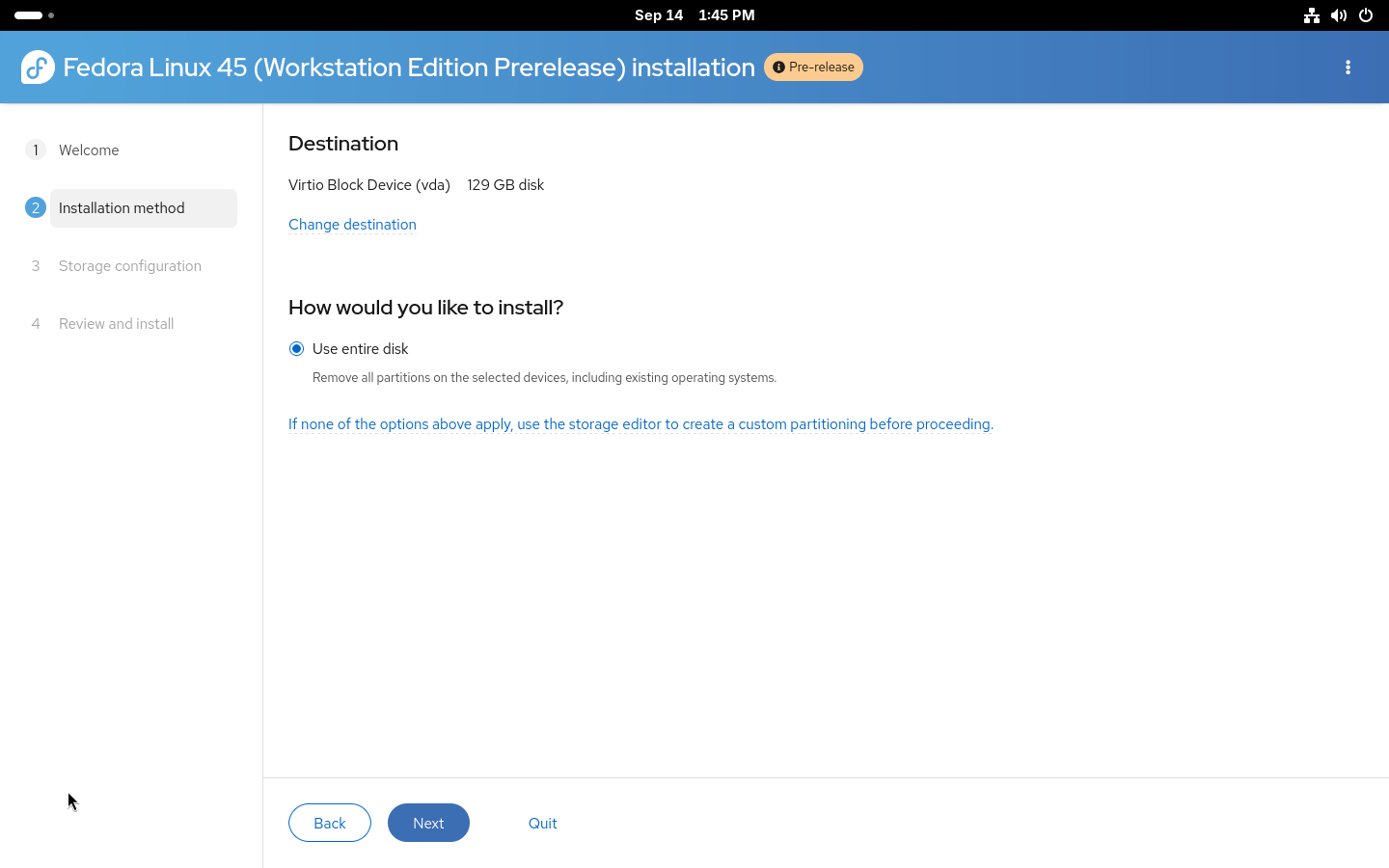
The Cockpit storage module supports a wide variety of storage configurations and Stratis is one of the supported technologies. Do not forget that with manual partitioning, you need to create all required partitions so first create partitions required for booting (/boot and /boot/efi or biosboot, based on your system configuration). After that, simply create a new Stratis pool from the menu.
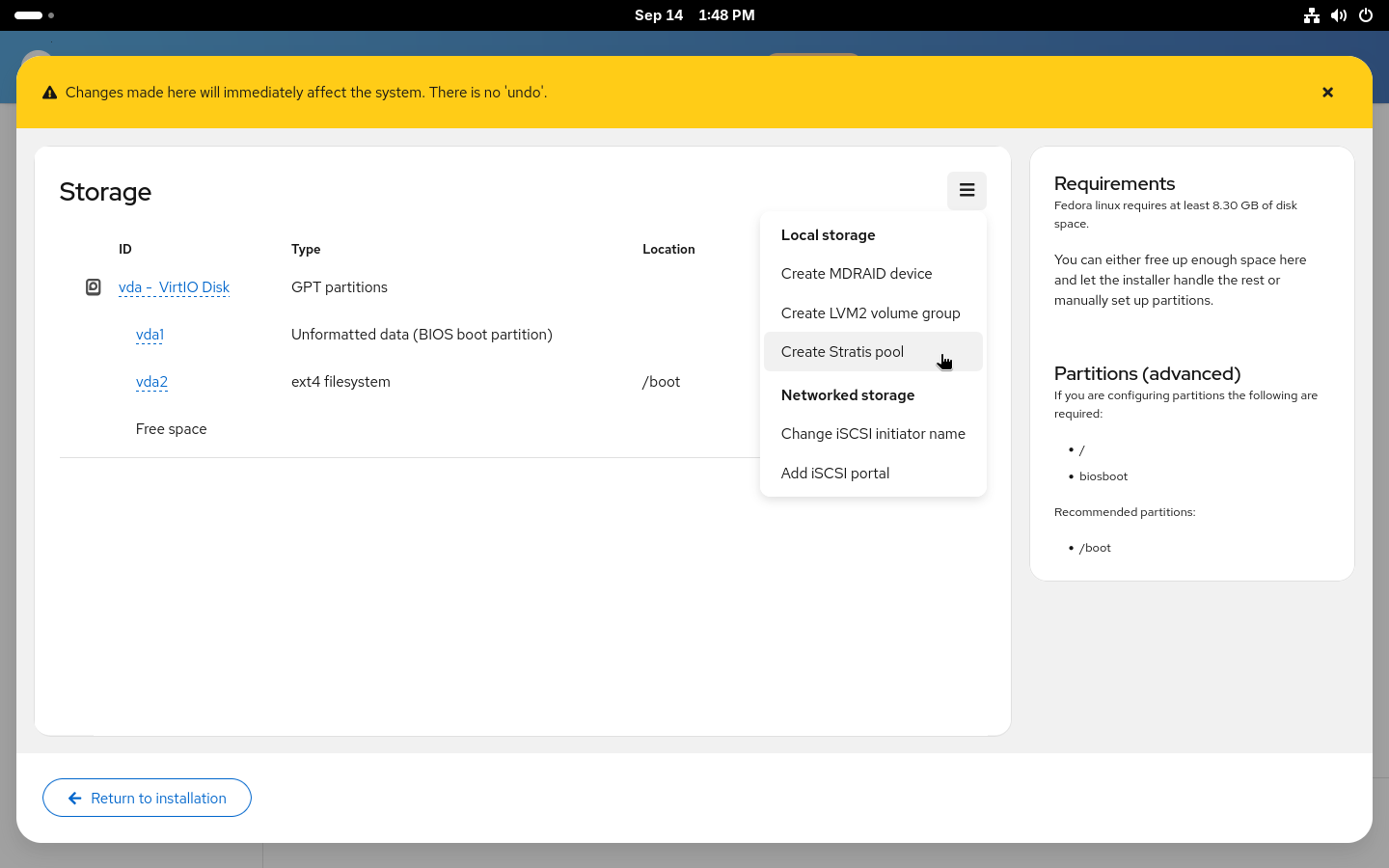
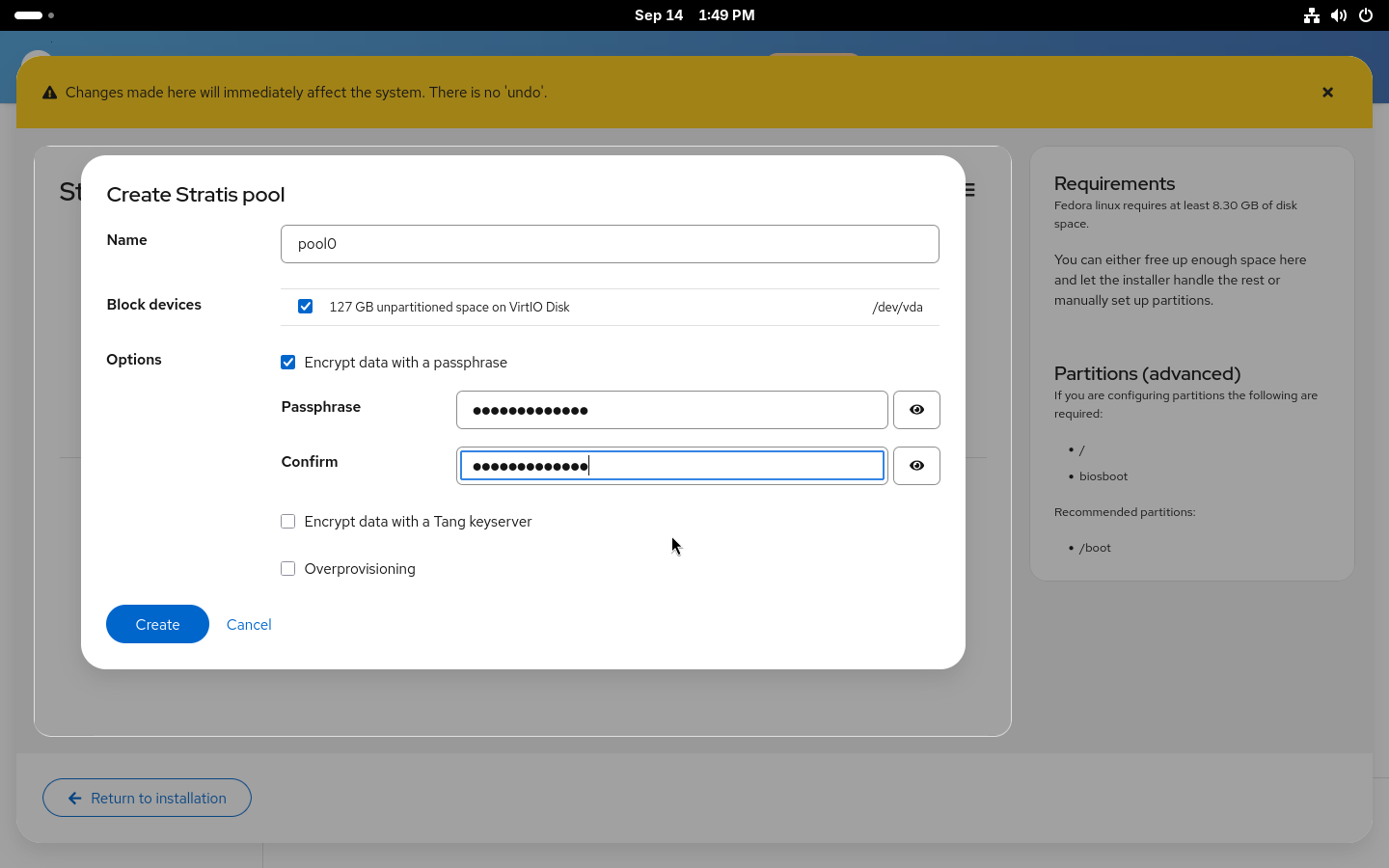
After selecting a name for the pool and the disk (or disks) it will be placed on, you can decide whether to enable encryption and over-provisioning for the pool. Over-provisioning allows allocation of more space for the filesystems created on the pool. Similarly to how LVM thin provisioning and Btrfs work. With over-provisioning enabled, there is no need to worry about running out of space in root with still plenty of free space in /home. It also allows greater flexibility when using snapshots. On the other hand, you actually need to be aware that you don’t really have terabytes of space and you need to make sure you won’t actually run out of space on your disk. Both encryption and over-provisioning can also be enabled or disabled after the installation.
With the new pool created, you now need to add some filesystems to it. You’ll most likely want the standard two separate filesystems for your / and /home. But you can also create a separate filesystem for your /var, for example.
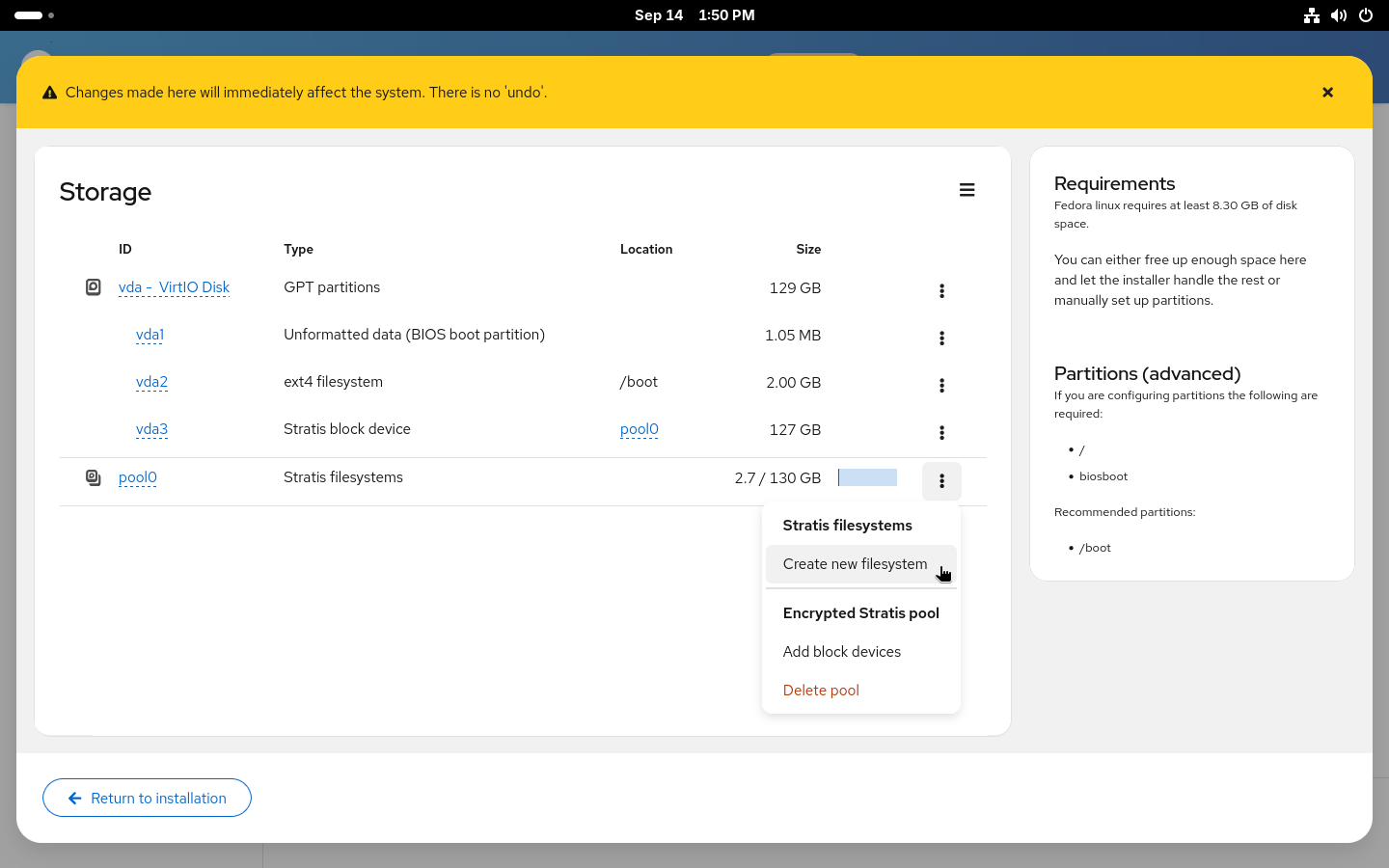
If you enable over-provisioning on your pool, you can also decide to not specify sizes for the filesystems and use the 1 TiB default size with over-provisioning or set a size limit for the filesystem to prevent it from automatically growing if you ever run out of space.
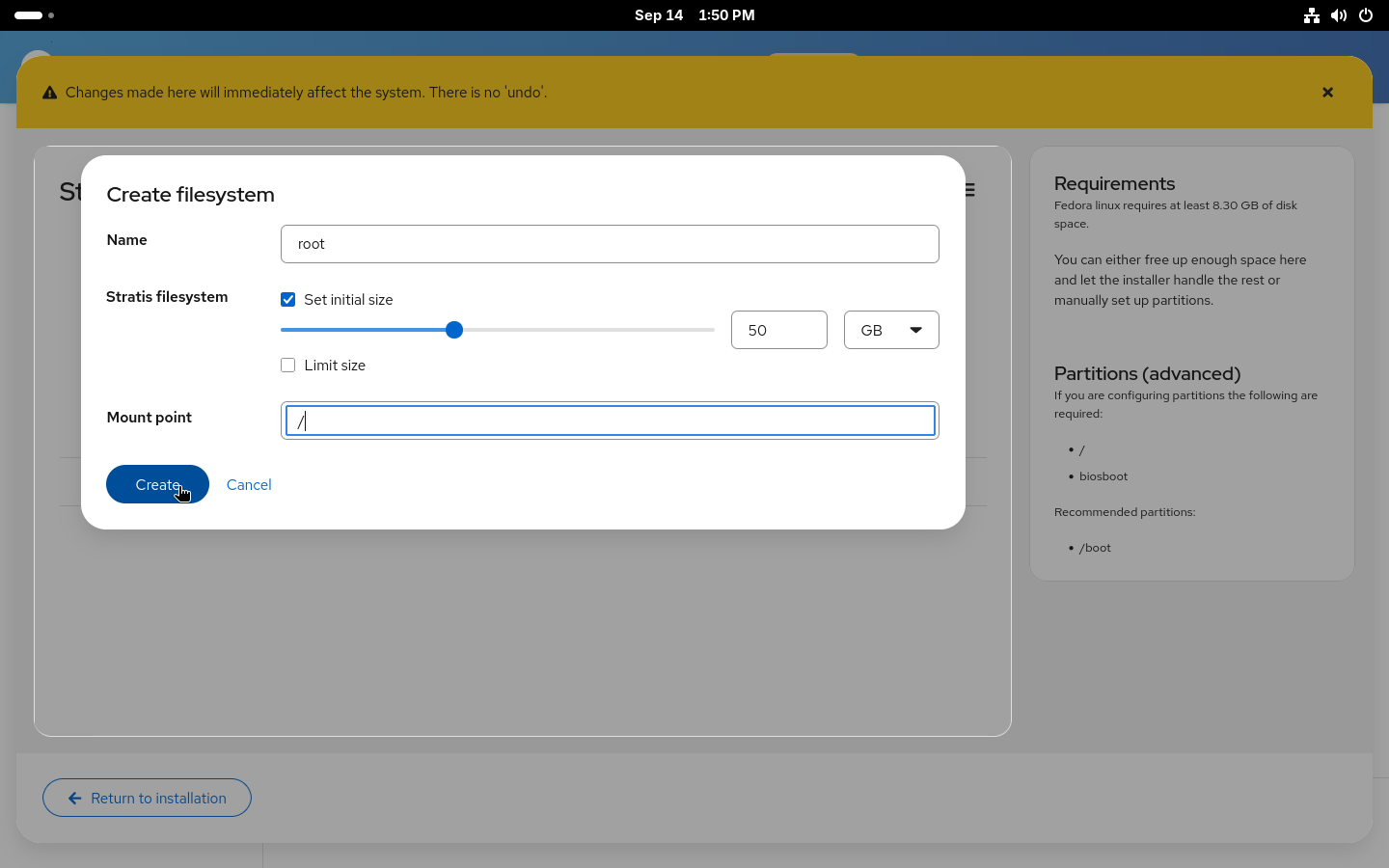
With all the filesystems created, you can Return to installation. Anaconda will check the created devices to make sure all requirements are met and return you to the Installation destination page where a new Use configured storage option will be preselected with the devices that were just created.
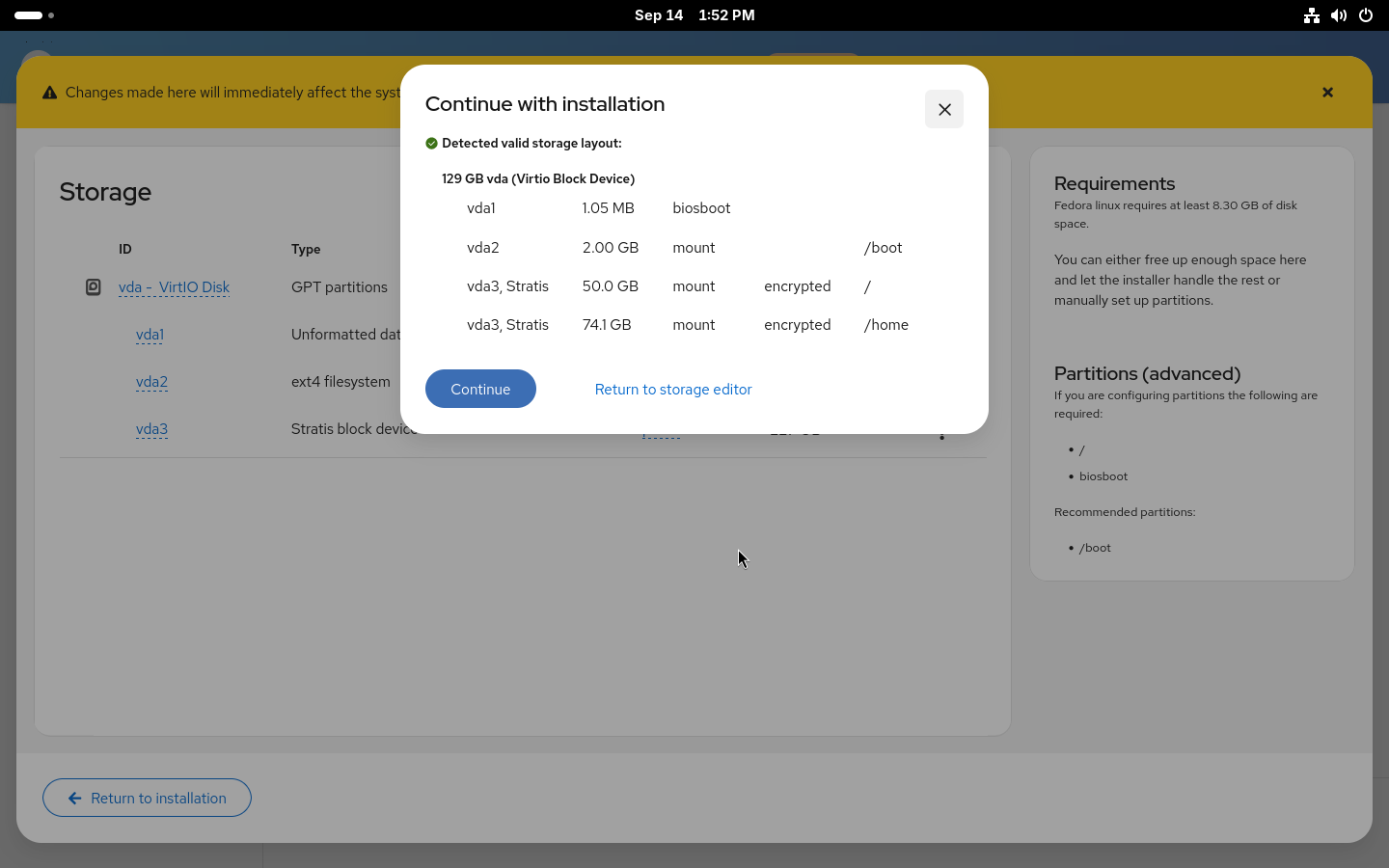
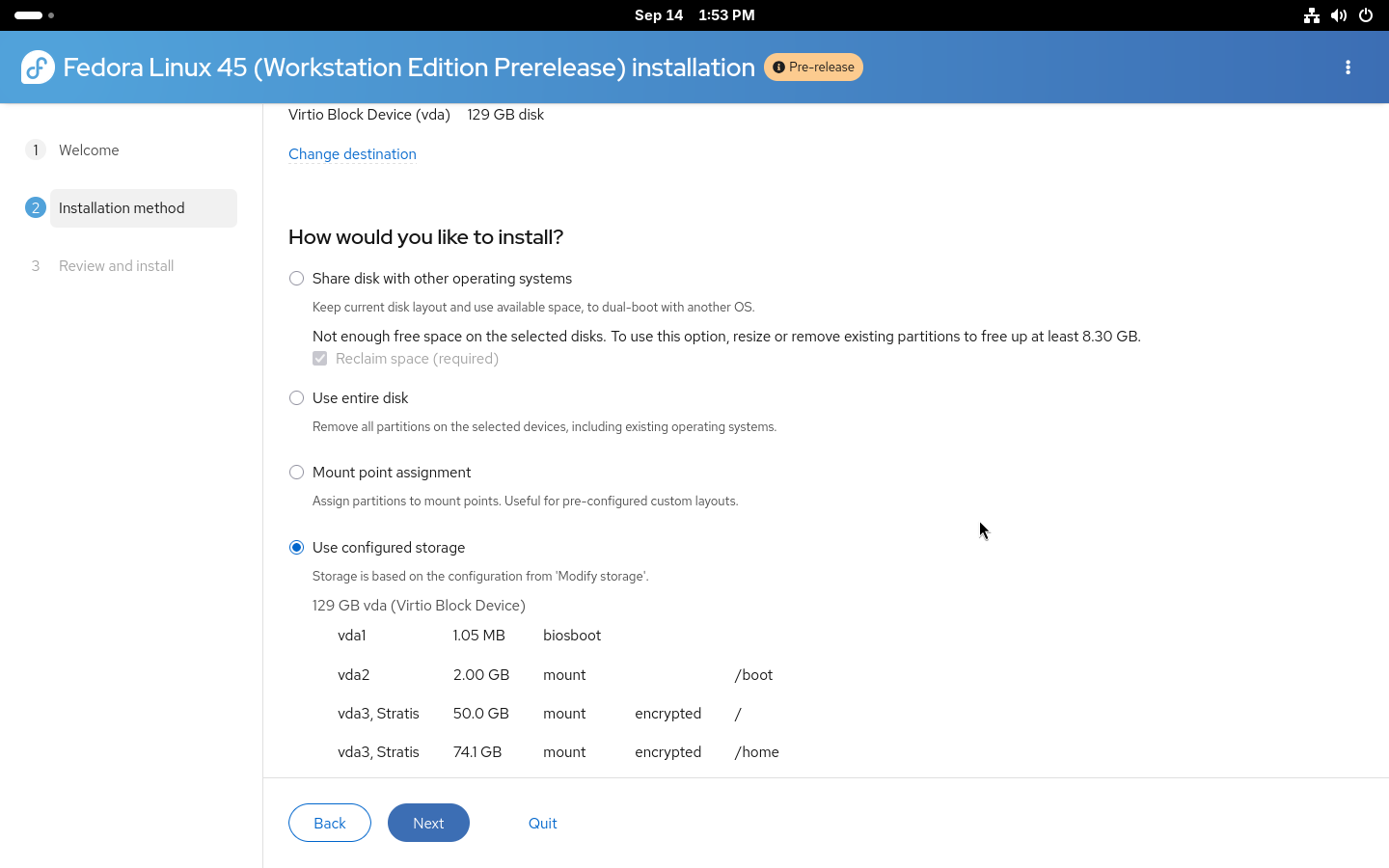
That is the storage part of the installation done. You can double-check on the Review and install page that everything is correctly set and start the installation.
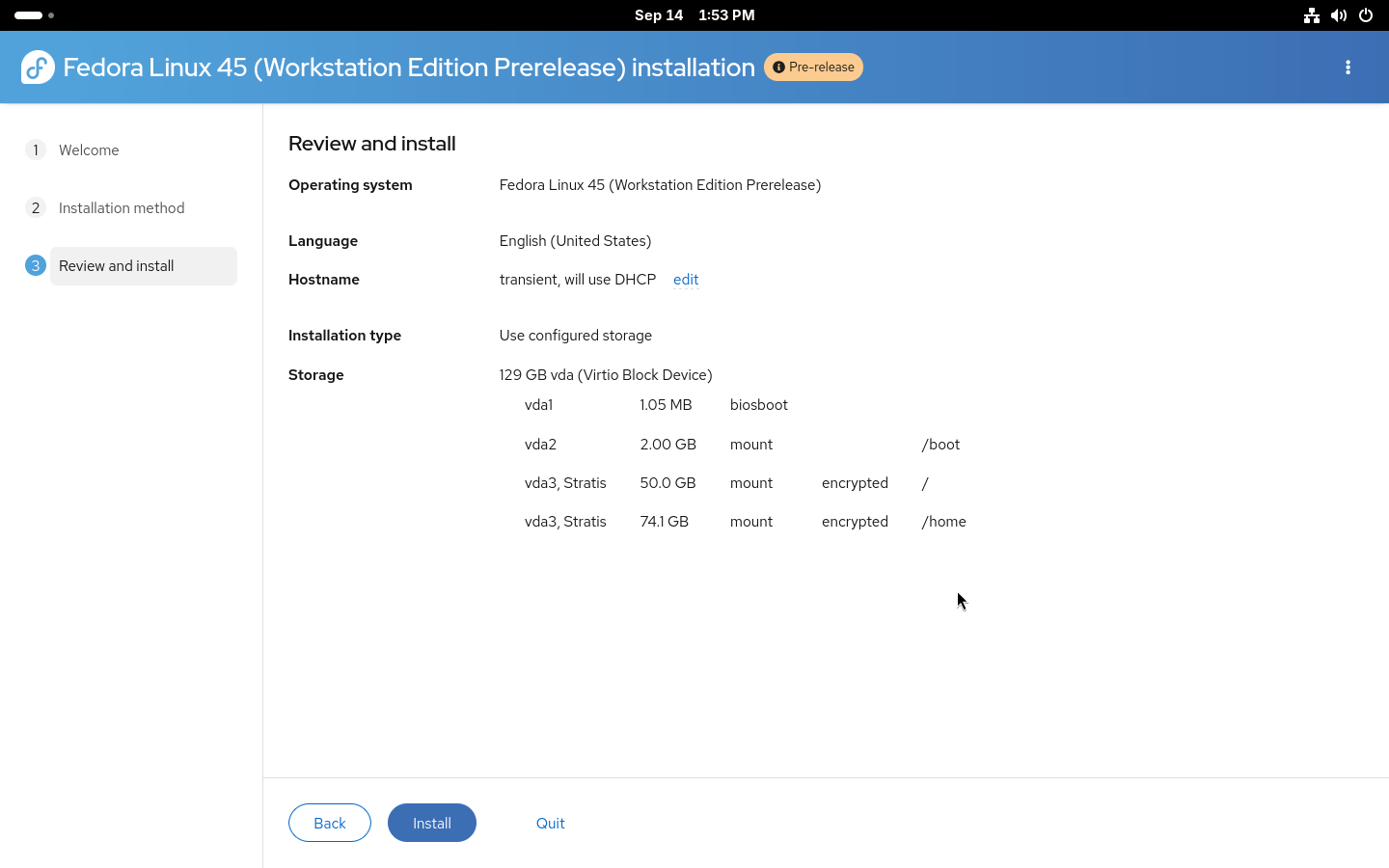
For advanced users who wish to use automated installations, full kickstart support for Stratis is also available. Both automatic and manual partitioning are available via kickstart.
Automatic partitioning is simple: the existing autopart command can be used with –type=stratis to create the default Stratis storage layout fully automatically. A storage section in kickstart, for setting up an encrypted Stratis layout, could look like this:
zerombr
clearpart --all --initlabel
autopart --type=stratis --encrypted --passphrase="passphrase"
Manual partitioning requires building the entire storage layout manually from bottom up. Two new Stratis kickstart commands were added: stratispool for creating and managing Stratis pools and stratisfs for creating and managing Stratis filesystems. Usage of these commands and most of the options are similar to how kickstart partitioning works with LVM. An example of a more advanced Stratis layout can be found below.
reqpart
part /boot --fstype=ext4 --size=500
part stratis.01 --size=1 --grow --ondisk=vda
part stratis.02 --size=1 --grow --ondisk=vdb
stratispool fedora stratis.01 stratis.02
stratisfs / --name=root --poolname=fedora --size=5000 --grow
stratisfs /home --name=home --poolname=fedora --size=1 --grow
Here we are creating a pool called fedora on top of two disks, vda and vdb, with two filesystems. One called root for / and a second called home for /home. The –grow tells the installer to use all available free space when creating the devices. For more details about the commands see the kickstart documentation.
The newly introduced Stratis support in Anaconda offers an easy way to take advantage of the modern storage features offered by Stratis. With the Web UI support available through Cockpit storage, you can now easily use Stratis on your system. We plan to simplify the process even more in future releases and enable even more advanced Stratis features.
If you run into any issues or have feedback, both the Anaconda and Stratis teams would love to hear from you.
admin )
on 2026-09-23 06:00:00 UTC
There will be a Fedora Copr outage while we upgrade infrastructure machines to the latest Copr packages.
The build queue processing will be stopped during the outage, and the Frontend/Web-UI will be down most of the time (no new tasks accepted). The DNF packages and repositories (hosted on copr-backend …
admin )
on 2026-09-17 12:00:00 UTC
On Saturday, August 22, 2026, the Fedora Project joined forces with openSUSE at Data Con LA 2026, hosted on the campus of California State University, Long Beach (CSULB).
Now in its 14th year, Data Con LA is Southern California’s largest gathering of data professionals, students, and practitioners covering data science, AI/ML, and data engineering. While Data Con LA is not a traditional Linux-centric conference, our presence offered a unique, hands-on opportunity to engage a fresh audience of prospective contributors, test our event planning workflows, and showcase Fedora Workstation in action.
As part of our ongoing work to standardize the Fedora Ambassador event pipeline, this report reflects on our operational outcomes, what worked well, and key lessons learned for future event organizers.
Our standout operational victory at Data Con LA was co-locating and sharing table space side-by-side with openSUSE advocates (coordinated with Patrick Finie / mir and Drew Adams).
Rather than maintaining isolated tables, we embraced the philosophy of “A House with Many Rooms.” This cross-community collaboration was an immediate force multiplier:
For future community organizers planning small-to-medium booths, establishing a shared booth with allied open source projects is an operational model we strongly recommend.
Over the course of the day, our booth engaged approximately 100 visitors (110% of our initial goal), with peak traffic occurring during the post-keynote morning rush (9:30 AM – 11:00 AM) and lunch transitions (12:30 PM – 2:00 PM).
The attendee demographic offered valuable insights into the broader tech ecosystem:
To connect directly with the conference’s AI/ML focus, we showcased a fully offline, containerized local AI demonstration running on an Apple Silicon laptop.
This demonstration served as a major crowd-pleaser across two distinct attendee groups:

If you are planning to organize a small event (under $150) or booth presence in the next six months, here are four practical takeaways from our experience:
We would like to thank Patrick Finie, Drew Adams, and the openSUSE community for partnering with us, as well as the CSULB organizers for putting together a fantastic event.
Following Data Con LA, our team of Ambassadors Perry Rivera and Rob McBryde are incorporating these lessons directly into the new Small Events Standard Operating Procedure (SOP) and preparing for upcoming community participation at SCaLE. Our intention is to share and publish this information in the Fedora Docs website so that other event owners in the Fedora community may benefit from common wisdom from others who have done this work before.
The post Fedora at Data Con LA 2026: Open Source & Local AI appeared first on Fedora Community Blog.
 You visited the Fedora booth at TXLF 2026!

The Fedora CoreOS and QA teams are gearing up for Fedora 45, and we need your help! We are organizing a Fedora CoreOS Test Week starting on September 21, 2026.
This event is a great opportunity for the community to test Fedora CoreOS (FCOS) based on Fedora 45 content before it officially reaches the testing and stable streams. By participating, you help us ensure a smooth and reliable experience for all users.
A Test Week is an event where anyone can help verify that the upcoming release works as expected. If you’ve been looking for a way to get started with Fedora contribution, this is the perfect entry point.
To participate, you simply need to:
The Wiki Page is your primary source of information for this event. It contains information on what to download (and from where), what and how to test, who you can contact if necessary, and where to report any bugs you may find. Once you have completed your tests, please log your results there!
Your contribution, big or small, makes a huge difference. Let’s work together to make Fedora CoreOS 45 a great release. Happy testing!
admin )
on 2026-09-15 14:05:00 UTC
We are happy to announce the availability of Fedora Linux Asahi Remix 45 Beta. This pre-release will bring the freshly announced Fedora Linux 45 Beta to Apple Silicon Macs. We expect to announce general availability of Fedora Linux Asahi Remix 45 in about a month. This will coincide with the overall Fedora Linux 45 release.
Fedora Linux Asahi Remix is developed in close collaboration with the Fedora Asahi SIG and the Asahi Linux project. Fedora Asahi Remix 45 Beta includes all of the Changes from Fedora Linux 45. Notably, this is the first Fedora Asahi Remix release to include out of the box initial support for Apple M3, M3 Pro and M3 Max systems, which are now officially supported by Asahi Linux upstream. The GPU drivers to enable performant 3D acceleration on these M3 systems are not included at this point and will be available via a Mesa update in the future. This release also includes support for hardware accelerated H.264 and VP9 video decoding for all Apple Silicon systems; additionally, Apple M3 systems include support for AV1 decoding.
You can try out Fedora Asahi Remix 45 Beta today by following our installation guide. Existing systems, running Fedora Asahi Remix 43 or 44, can be updated following the usual Fedora upgrade process. Upgrades via Fedora Workstation’s Software application are unfortunately not supported and DNF’s System Upgrade plugin has to be used.
Since this is a beta release, we expect that you may encounter bugs or missing features. Please report any Remix-specific issues in our tracker. You may also reach out in our Discourse forum or our Matrix room for user support.

Fedora Linux 45 Beta is here! On Tuesday, 15 September 2026 you can download or upgrade your systems from your usual spots to start enjoying what F45 has to offer early.
You can download F45 Beta, or our pre-release edition versions, from any of the following places:
You can also update an existing system to the beta using DNF system-upgrade.
The Fedora Linux 45 Beta release content is also available for Fedora Atomic Desktops, Spins and Labs, with the exception of the following:
Fedora Linux 45 replaces the legacy in-kernel console with kmscon, bringing smooth rendering, better Unicode/font support, and enhanced system stability.
Fedora Linux 45 now requires valid package signatures by default before installation, preventing unsigned packages from being installed unintentionally.
Desktop secret management has also been standardized across environments with oo7, replacing legacy backend implementations like GNOME Keyring and KWallet.
Fedora Linux 45 Beta has a lot of new versions available, including Podman 6, Pandas 3, MySQL and MariaDB, to name but a few, and boasts early access to updated toolchains and runtimes, including Python 3.15, Go 1.27, GCC 16.2, and glibc 2.44.
Atomic Desktop ISO builds also now use image-builder, and Fedora Linux 45 beta adds systemd-oomd and zram swap support to Fedora CoreOS.
Anaconda now has initial WebUI installation flows for Atomic Desktops, and native support for partitioning stratis filesystems.
Visit the Fedora Linux 45 Change Set page for more details on the changes in store for this release.
jflory7 )
on 2026-09-15 08:00:00 UTC
In July, I shared an update about my new role as AI Alignment Community Architect at Red Hat, focused on Fedora. This post clarifies what that role entails, why "AI alignment" is more than a technical term, and how I plan to support the Fedora community in leveraging LLM-gen-AI.
I organized this blog post into three sections:
Reclaiming AI Alignment: The meaning behind the term.
Model builder engagement: Why do we need bidirectional feedback loops?
My work in Fedora: Upcoming priorities this quarter and the path forward.
|
Note
|
I use the term “LLM-gen-AI” throughout this article aligned to the Software Freedom Conservancy’s recommendations. This is in support of addressing this technology in community-first terms. |
As I defined my new role, I carefully considered the title. The Fedora community sentiment toward LLM-gen-AI is deeply divided: some rally against it, while others push for rapid adoption without wider community consensus. I needed a title that signaled a neutral, balanced approach. My mandate at Red Hat is to support upstream projects in adopting AI, focused primarily on Fedora. Working in the “AI” space at Red Hat is fascinating because I am exposed to diverse ways that customers use and deploy innovative open source technology. Additionally, Red Hat provides real value by supporting customers in their “hybrid AI” journeys. Many of my Red Hat colleagues consistently push for more Free Software and open source answers for customers and enterprises building infrastructure to support AI inference, local models, and more. Red Hat has a responsibility to innovate when new technology opportunities emerge that its customers are acting upon. With this in mind, I am more convinced that LLM-gen-AI is something that open source maintainers and contributors can leverage for real workloads. There are opportunities to solve real problems and routine maintenance tasks for complex projects. LLM-gen-AI used right can support maintainers in automating boring, cyclical work so they can focus more on the exciting work of innovation and focused engineering efforts within their projects. Or even going outside and spending time offline.
However, I distinguish "AI alignment" from "AI adoption." "AI adoption" communicates a pre-defined, non-negotiable stance where the goal is simply to increase usage. "AI alignment," by contrast, communicates that LLM-gen-AI use exists on a spectrum.
My intent in Fedora is not to insist, but to negotiate and compromise. I want to align how our community uses these tools with our existing values, norms, and culture.
My approach to "AI alignment" is influenced by the CHAOSS Project. I co-chair the CHAOSS AI Alignment Working Group with Emma Irwin and Coraline Ada Ehmke. Recently, Emma, Adrian Edwards, and I presented at FOSSY 2026 on this topic in greater detail. This experience frames my definition of "alignment" as I move forward in my new role.
Traditionally, "AI alignment" is a term used by model builders to describe processes where communities have little influence. As LLM-gen-AI grows in widespread use, the power gap between those model builders and the communities they impact will widen. This creates an unsustainable dynamic in the safety and well-being of our communities with these new tools.
We need more than just "AI adoption". We need bidirectional feedback loops. Free Software communities deserve a seat at the table. This is not just for iterating on model development, but for defining how we integrate LLM-gen-AI tools sustainably and responsibly.
To achieve this, we (i.e., open source community citizens) need a stronger value proposition for engagement with model builders. Whether commercial or altruistic, we must persuade model builders that a community-driven approach is a critical advantage. If we refuse to engage, we risk Free Software values and culture being shut out of conversations entirely. So, I believe it is better to be an advisor than a bystander. Advising is its own form of open source contribution. Therefore, I lend my support toward the wider notion that "AI alignment" fosters two-way conversations that ensure model builders actually listen to the communities their work impacts.
September 2026 is my first full month in this role. While there is still much to define, a few priorities have emerged. Here is where I will be focusing my initial energy:
Migrating "This Week in Fedora": Aurélien Bompard (@abompard) created a useful tool for AI-curated, human-reviewed weekly summaries. Currently, it lives on a personal fedorapeople.org space. I am beginning to work with Aurélien to migrate this to a weekly WordPress article on the Fedora Community Blog, since we first began talking about this in July. I am already submitting pull requests to support this transition.
Launching LLM-gen-AI Agent Skills: Together with the AI/ML SIG, we are building the Fedora Agent Skills Library. These define best practices for using LLM-gen-AI agents to automate routine maintenance. My immediate task is community architecture: setting up the repository for contributions and improving documentation so these skills are accessible and scalable.
AI/ML SIG Documentation: As the Fedora Docs Team works to identify "team captains" for specific topics, I am volunteering to lead AI/ML SIG documentation. This involves importing or deprecating content in the Quick Docs site and migrating extensive Wiki documentation to the Fedora Docs site, creating a central, discoverable home for all things LLM-gen-AI in Fedora.
An update to the Fedora AI-Assisted Contributions Policy?: Honestly, I am not sure about this one yet. But it seems apparent to me that eleven months after the Fedora Council first introduced the Fedora AI-Assisted Contributions Policy, it is time for an update. Nearly a full year of lived experience has happened within the framework of this lightweight policy. Furthermore, a coalition of Fedora contributors agree that an update is needed, but there is not a single, shared view of what those updates should be. It will take more community input and feedback to shape the next iteration to that policy. I anticipate facilitating inclusive future community conversations about what those changes should be.
I am both excited and nervous to work with fellow Fedorans on these initiatives. I know there are strongly-held opinions on both sides of the LLM-gen-AI debate. (An understatement!) I accepted this role because I believe participation is more constructive than standing on the sidelines. My goal is to navigate this work in alignment with Fedora’s Four Foundations: Freedom, Friends, Features, First.
Since March 2026, I invested a lot of time into migrating my blog to a new publishing system and improving the website user interface. However, now that my site is fully functioning on a technical level, it is refreshing to begin writing content again here. There is more to come from me in this space. Expect new content about my work in Fedora and the LLM-gen-AI space, and other open source and personal items too.
admin )
on 2026-09-09 08:00:00 UTC

After months of good old fashioned struggle with Google Drive and YouTube Studio, we were finally able to prepare the video sessions from the 2025 and 2026 Flock To Fedora event livestreams. These are now released to our YouTube and PeerTube communities. This article describes the details of the entire process that got us from the raw footage to the final uploads. It documents all our learnings along the way from the vendor selection to the FFMPEG configurations!
While I was on my way back from Prague, after participating in Flock To Fedora 2026, I thought to myself – “Uploading the session recordings to YouTube should not be that difficult, right?”. I was, of course, very humbled when I instinctively reached out to (erstwhile Fedora Community Architect) Justin Wheeler to obtain the livestream files. I was very surprised to find that there indeed was an existing process, so I did not necessarily have to reinvent the wheel.

A couple years back, Adrian Edwards had worked on the tooling to more or less streamline slicing, thumbnailing, metadataing (are those actual words?) and uploading to our YouTube channel. There were, of course, changes to be made on the documented processes, but since the uploads for the 2025 events were partially done, that was a good starting point. We were yet to receive those from the 2026 events so I had some time to acclimate to the existing methods.

Of course, the first roadblock was as foundationally trivial as having wrong paths for the footage grouping. Flock To Fedora 2025 occurred during four days (i.e. 04th June 2025 to 07th June 2025) and across four distinct tracks (i.e. Plenary, Topaz, Opal and Quartz). This meant I had to untangle the messily organized footage files. As we were already a year late to upload the Flock To Fedora 2025 recordings, we knew that we could take some time to do it right.

I onboarded Shounak Dey, a fellow Fedora Infrastructure contributor who had previously helped me with the Fedora Badges Revamp Project, to help me out with this. He was able to maintain spreadsheets for the footage files and their corresponding mappings. That allowed us to quickly move to the next step. While I initially started using SponsorBlock to annotate the video timestamps, I quickly reverted back to manually eyeballing them using VLC Media Player.

Delegation was key here. While Shounak worked on manually annotating the video timestamps, I focussed on slicing sessions from the footage files using the LosslessCut application. With Adrian’s Python scripts coming in the clutch and Justin giving the necessary access to Shounak, the only thing holding us back was the network bandwidth at that time. We earmarked some changes for the documentation updates, but we had to keep those for later when the processing was complete.

Justin and I were planning on a phased video release model, with sessions coming out on PeerTube first, before coming to YouTube. The videos being released gradually on both the platforms would ensure that we were able to retain the audience footfall and general relevance. In between – we had to bide our time if we wanted to succeed. I was gradually getting back to my day job as I worked through my event report for the Flock To Fedora 2026 conference.

The processing scripts and relevant documentation were available, however, I had to go looking for the thumbnail templates. It did not help that those files were on a separate repository, thus making it difficult for some contributors not as involved as us to be able to discover them organically. Shounak kept jotting down the improvements to the documentation that he would make once we were done with processing livestreams for both 2025 and 2026.

What did not help was the buggy nature of the InkScape plugin for generating thumbnails using the discovered template called NextGenerator Addon. Honestly, I was at my wits end — as I was no designer and had no idea how to tailor fit the generated templates from the flaky extension. With some help from Emma Kidney and Madeline Peck, we were able to drive it home as they began working on the templates for the 2026’s edition of the Flock To Fedora 2026 event.

By the last week of June 2026, we had received the footage files from Flock To Fedora 2026. I had access to the Fedora Project’s YouTube channel, from back in the Fedora Websites And Apps days, and had begun uploading the sessions while marking them as unlisted. The learning ordeal from the footage processing of Flock 2025 gave us enough idea about how to proceed. This sped things up significantly once we were done with the growing pains of the required tooling.

I focused on uploading the 2025 slices on Google Drive for Justin to be able to upload them later onto PeerTube. At the same time Shounak stepped up to participate in the Marketing Team as an official member. There were some missing recordings that we pursued with Dorota Volavkova for multiple weeks. This was in vain and we ultimately settled for the lower quality YouTube VODs. We were more or less gradually closing on the finish line with this entire initiative. Or at least, so we thought…

This week we faced a new problem! About ten of our uploaded videos from Flock To Fedora 2025 did not have an audio playback in them. The audio tracks from the source files were unable to be muxed into the MP4 format. We had to losslessly convert the PCM format audio to the AAC format first. This came to our attention from a YouTube viewer’s comment message. We had to resort to unlisting the affected videos and uploading them as a separate entry.

With Shounak pushing his documentation changes, I worked through this problem since this had to resolve as soon as possible. Late uploads for 2025 was already bad enough. We did not want the affected videos to create a new problem. After spending almost half a day learning FFMPEG’s configs and documenting those, I was able to put it back into Justin’s hands to reschedule the release of the (now fixed) session recordings.

One of the (rather unarguably) best ways to fix a problem is to first face the problem itself before rolling up your sleeves to resolve it. What I initially thought would be a very atomic and less influential contribution method ended up touching on a wide part of Fedora Project’s community processes. Not only were we able to get these videos out for 2025 and 2026, but we were also able to mark a path forward for those who come after us wanting to do this for future events.
admin )
on 2026-09-07 08:00:00 UTC
Recently, Framework announced their new Laptop 12, which optionally comes with the KDE Edition of Fedora Linux pre-installed. Framework’s modular hardware has long captured the hearts of tinkerers, and many Framework users were already running Fedora Linux. Giving community members the option to unbox a hardware-validated, pre-installed Fedora KDE system is the culmination of months of effort from both Framework and dedicated Fedora community members. I’d like to take a moment to reflect on the hard work of the Fedora community that’s made this possible
The Framework Laptop 12 is a 12.2” 2-in-1 convertible laptop complete with a touchscreen and stylus support. Delivering a seamless experience on a form factor like this requires an interface that excels across traditional, touch, and pen modes.
Enter Fedora KDE Plasma Desktop.
Over recent release cycles, the Fedora KDE Special Interest Group (SIG) and upstream KDE contributors have poured immense effort into refining the user interface. This includes touch navigation, gesture support, virtual keyboards, and digital pen input under Wayland. Combined with the brand-new Intel Core Series 3 architecture, Thunderbolt 4, Wi-Fi 7, and options for a backlit keyboard and fingerprint reader, the hardware and software form a cohesive unit.
“The Fedora KDE Plasma Desktop contributors work hard to make the Fedora KDE Plasma Desktop edition the premier KDE experience for users. It’s great to see Framework customers have the choice to have it pre-installed.”
— Jef Spaleta, Fedora Project Lead
Bringing a brand-new hardware platform with bleeding-edge components (like Intel’s Core Series 3 chips and BE213 Wi-Fi 7 modules) to pre-built availability doesn’t happen by accident. It takes rigorous testing, community bug hunting, and close collaboration.
Long before today’s announcement, Framework provided pre-release hardware to Fedora QA and SIG contributors to ensure day-one hardware enablement:
Starting at $699 USD for the Fedora pre-built configuration, the Framework Laptop 12 demonstrates that a fully modular, repairable, open-source-friendly laptop can be accessible, performant, and ready to go from day one.
Thank you to every member of the Fedora Quality Assurance team, the Fedora KDE SIG, and the broader upstream community who submitted test reports, verified kernel patches, and helped make this launch a massive success!
Disclosure: We used generative AI to outline and draft this post, but real humans shaped, verified, and reviewed it.
admin )
on 2026-09-04 20:54:40 UTC
A few short how-to’s with screenshots, showing easy ways to boot up off a USB live ISO and return back to previous points in time with BTRFS.
Many Linux distributions now default to BTRFS as the standard installation filesystem. Fedora Linux is no exception to that.
2022/23 saw a lot of articles extolling its virtues of easy rollback, stability and so forth. All complete with paragraphs of command line instructions.
Times have changed, the BTRFS infrastructure has matured, and there are now easy to use GUI tools at our fingertips.
You may use any standard Fedora Linux ISO image and USB stick.
This article is for people new to Fedora Linux and for those who are familiar with ext4 and Timeshift.
My experience with Linux goes back quite a long way.
There used to be a time when the Fedora Linux help links often routed to Red Hat Enterprise. This generally targeted the needs of network managers and other system professionals.
Thankfully, for ordinary users the situation has now improved. The Fedora Magazine is one of those reasons.
In the last few years I have been using Fedora Linux as test-bed virtual machines and I have been using Fedora Kinoite on a secondary laptop.
As a daily driver, the thing that most recently stopped me switching to Fedora Linux was not being able to find easy to follow instructions on snapshot recovery during system boot failure.
This article lists the solutions that I finally pieced together.
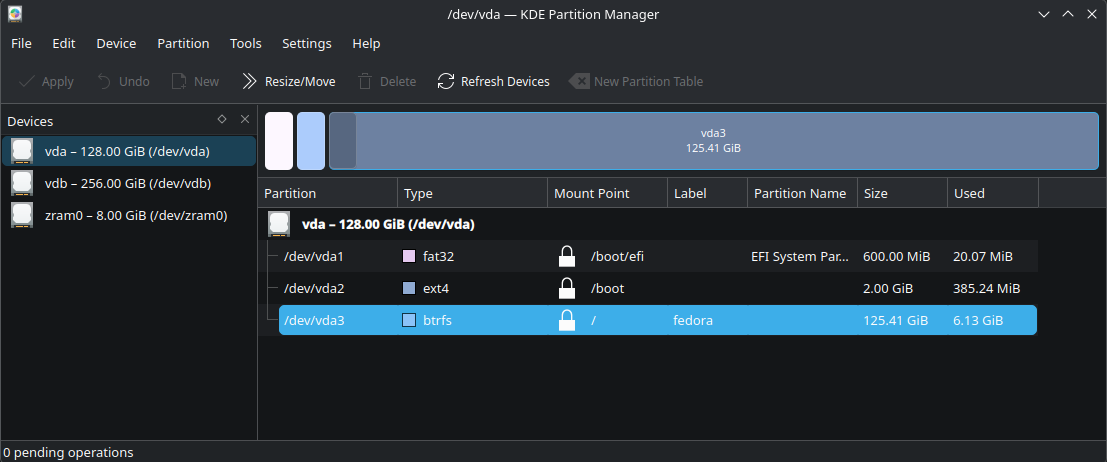
First, make sure that you do actually have your OS running with BTRFS.
This is now normally the case but if you have had your installation for a few years, or someone else installed it for you, it is wise to check.
On Fedora Workstation, with Gnome, try disks or gparted. These two will also install readily on KDE and many users actually prefer them to the KDE partion manager.
Many people welcomed the 2025 decision by the Fedora steering committee to promote KDE to parity status with (Gnome) Workstation. This guide covers both official versions.
If you don’t have Fedora Linux yet, there are also a few notes on general setup as well.
You may have seen btrfs-assistant mentioned in forum discussions. If you don’t already have this program installed, then now is the time to look at doing it.
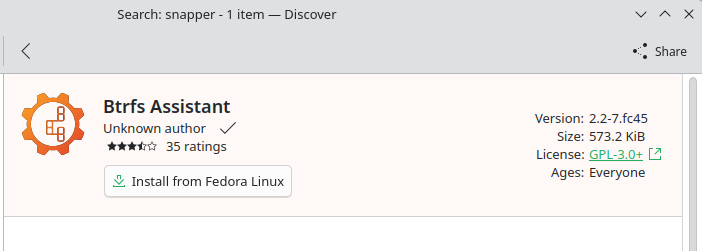
The package only takes a tiny amount of space and also installs snapper. About 4MB in total. Either Gnome Software or KDE Discover are fine. Or you can use dnf on the the command line.
Up and running:
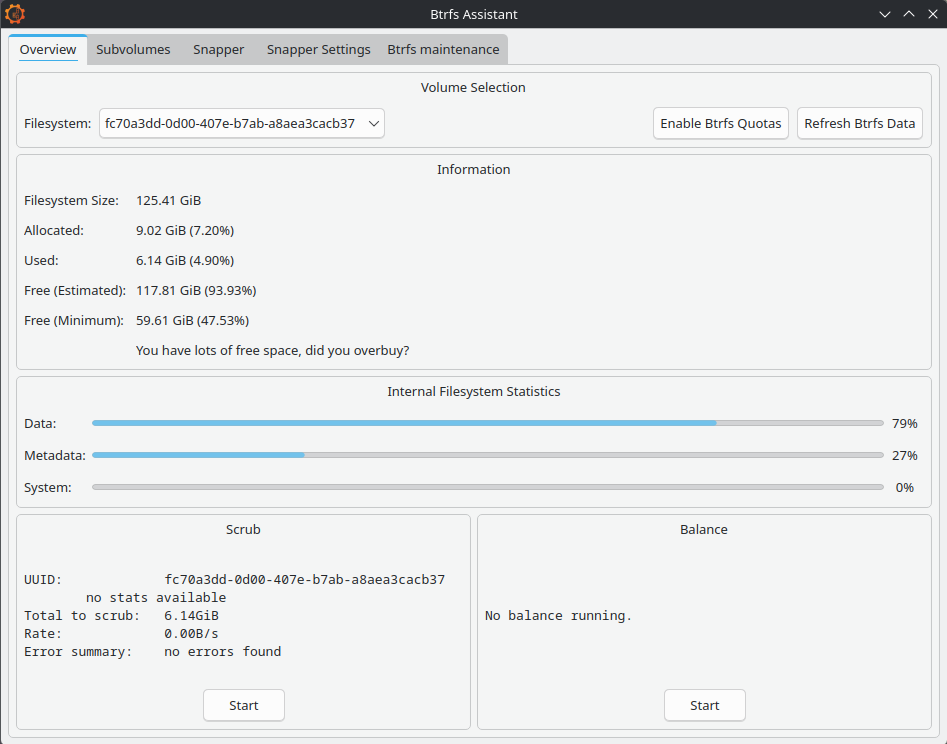
Registration of existing sub-volumes is automatic:
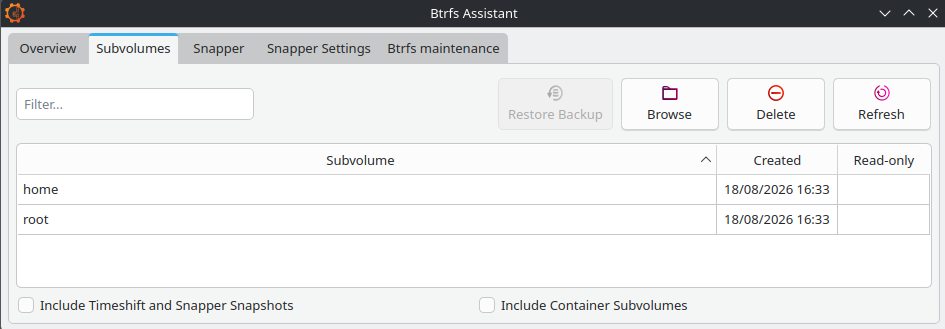
By default, Fedora creates two sub-volume sections on standard installation. We can only see them in the file manager when we boot via a USB live ISO, otherwise we see the volume contents only.
Partition managers such as gparted may show the partition as complete but the file system won’t work unless we have set up the logical sub-volume overlay inside of it.
If you are using Gnome Workstation you may probably see an additional sub-volume ‘/root/var/lib/machines‘ which, unless you are working with container built machines, will be empty. It’s just there to exclude temporary files from any snapshot processes and can be ignored too.
Anaconda is the in-house installer and I have been quite impressed with its recent incarnations.
The default installation route is decidedly the easier option at present.
However, for users wanting to add extra sub-volumes, the best method may be right at the start when you are offered the Storage Editor option. If using pre Fedora Linux 45, you can also find it at the top right corner of the interface.
Fedora Linux will happily install alongside your current setup if you want to try things out.
I have found that the best method is to use gparted to prepare a section of non-allocated disk space to offer the installer to work with, rather than offering it a ready made partition.
Creating new sub-volumes requires the command line. This is for advanced users only.
In theory, Blivet-gui claims to be able to do this task but I am yet to be convinced. Btrfs-assistant leaves this bit well alone, which is what we are going to do.
There isn’t much that we can do with the actual sub-volumes, as they stand. The Copy On Write (CoW) mechanism is there and working. That’s about it.
But backups are always good to have, so make sure that you have got one before you start setting things up for real. We’ll have a look at this in detail later on.
There are btrfs command line methods for sub-volumes using send and receive but the concepts can get quite complex.
Making standard partition backups are much easier using dd or Gnome Disks, just as if we were using ext4, and they are equally effective for basic needs.
These are what really sets BTRFS rollback into a totally different league compared to using Timeshift.
To get this working we are going to use Snapper:
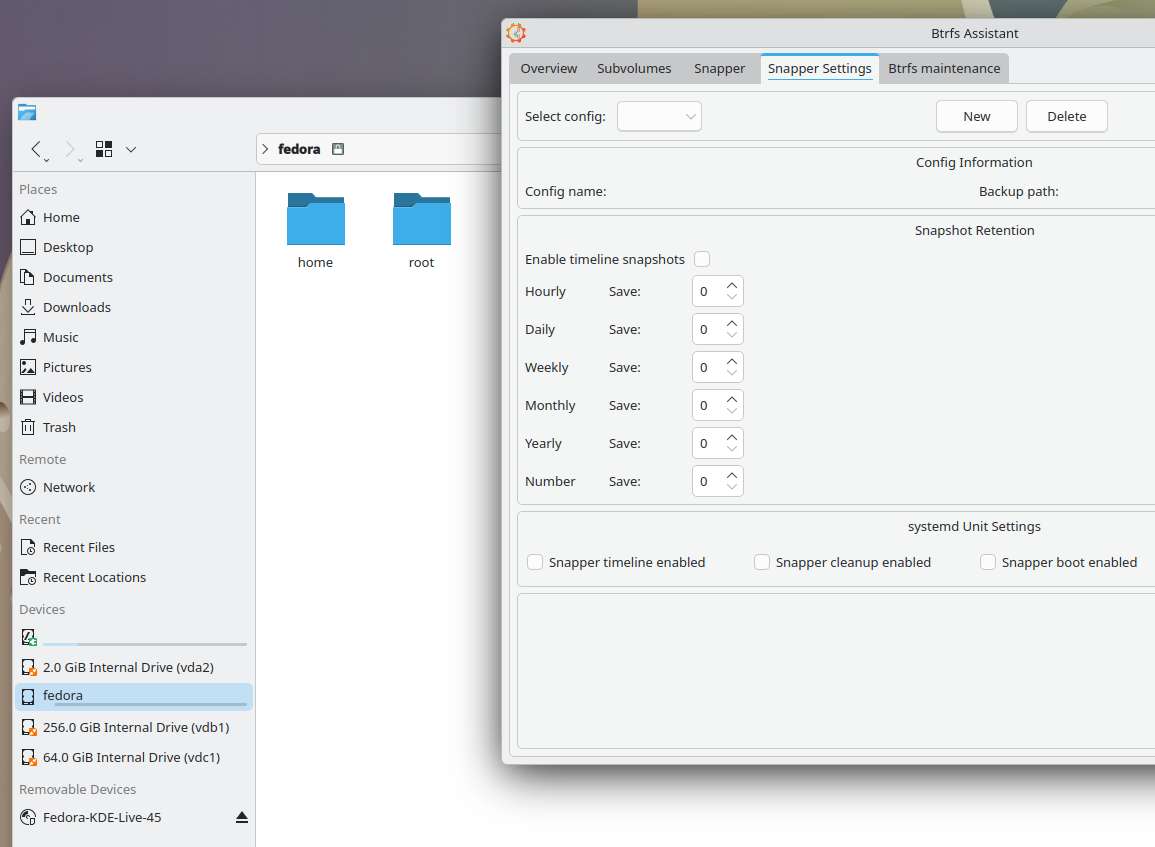
You may find mention on forums about using Timeshift on Fedora Linux BTRFS with Ubuntu style @ sub-volumes. This now no longer works unless you are using something like Linux Mint. It was never probably a good idea to start with but it does illustrate the extents to which people have gone to, and just to get some kind of easy GUI recovery setup going.
We need to set up Snapper before things go wrong.
If you have arrived at this article through a web search and are in difficulties, unless you have previously setup snapshots, you are going to be restricted to using the command line.
Command line btrfs is actually the foundation program used to create and manage the overlay sections. Snapper helps us work with the btrfs snapshots.
Several command line articles are available: https://fedoramagazine.org/?s=btrfs
The place to start is at the Snapper Settings tab. Click ‘new’ and fill in the details, one for ‘root’ and one for ‘home’:
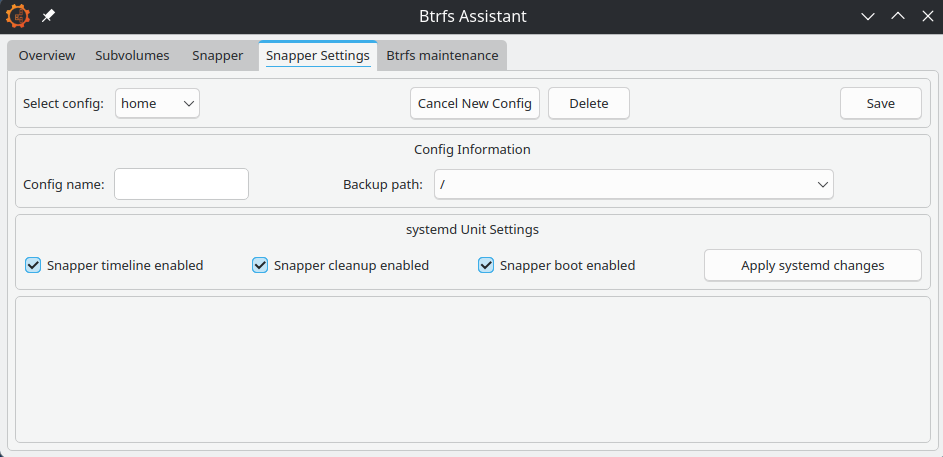
The backup and target paths must both be on the same partition. Otherwise, the docs say that you can place sub-volumes anywhere. BTRFS uses hidden sub-volumes, so placing ‘root’ at ‘/’ and ‘home’ at ‘/home’ is as good a place as any, probably.
In our setup, root means everything except the home folder. And the home folder will neatly hold the home snapshots.
Snapper will place its config files at ‘/etc/snapper’ if you need to find them.
Enable timeline, cleanup and boot. Click the save button.
The first config save will set up the config file. We now have to set the numbers.
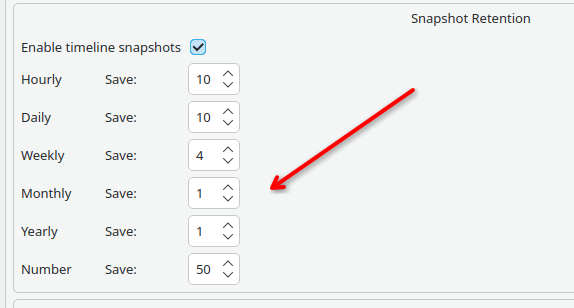
I don’t know if is intentional for Snapper to default to saving 10 whole years of snaps and nothing weekly. Perhaps it’s something to do with openSUSE and and their long term server support program?
For everyday use, these figures need changing. And the root volume needs to be treated differently from the home one.
I am currently evaluating the above set for root, with 15, 10, 5, 3, 1, 50 for home. Although, I am wondering if these these figures could be a bit too high …
The number defines how many snapshots the timeline cleanup algorithm should keep, counting from the youngest.
When done, save again, then apply systemd changes.
Make sure that you don’t get carried away. Snapshots are very easy to take. We’ve all probably seen stories of people filling their houses with 20 years of old newspapers.
One or two snapshots of old kernels and firmware updates might get us out of problems but we don’t really need to keep Gigabytes of these for months on end. Conversely, it could be invaluable to find some small but important documents that got accidentally deleted a few months back without us realizing.
The dangers of system bloat could well be one of the reasons that Fedora Linux doesn’t have snapper already installed.
This is normally fully automated and happens in micro-seconds. A very different scale to ext4 and Timeshift where we are frequently talking of minutes.
Manual snaps are great as well. Maybe just before doing something that could go wrong is a good idea.
If you set up the Snapper boot config option, an instant snapshot will be taken at every boot time, so any errant updates can be very easy to reverse too.
Different copy on write file systems can have both subtle or major differences but the basic b-tree principles tend to remain. If you want a deep dive into the theory, there’s lots out there.
The BTRFS system is continually working on records of what is happening, so data processing requirements are very small. In simple terms we can look at this as making tag at a point in time on a type of continuous and interconnected meta-data event log. When we roll back, we return to the tag and restart the recording on a new branch.
Select the Snapper tab and then the sub-tab for Browse/Restore:
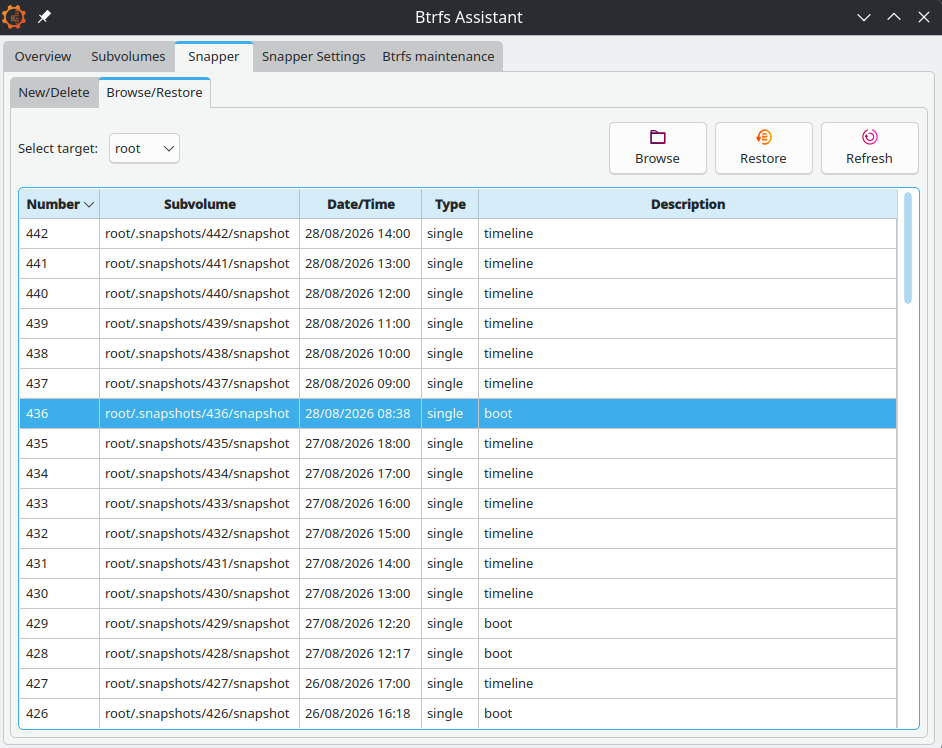
Find the snapshot that you think you need and click on Browse to see what’s in there. The Browse function also lets you restore individual files rather than whole snaps. Keep an eye on the target drop down which will change when you switch tabs.
BTRFS is night and day faster than the qcow2 systems used on virtual machines. The same for Timeshift. Only a couple of seconds are needed, even for very old snapshots.
On this tab, scrub is probably the only important one. The docs say this should run at least monthly. If you have done a lot of snapshot rewinding then a manual scrub is a good idea.
Balance is for balancing RAID devices and you only really need defrag if you are running on a mechanical hard drive. An SSD will have its own optimising system built in but you could run defrag manually every year or two if you want.
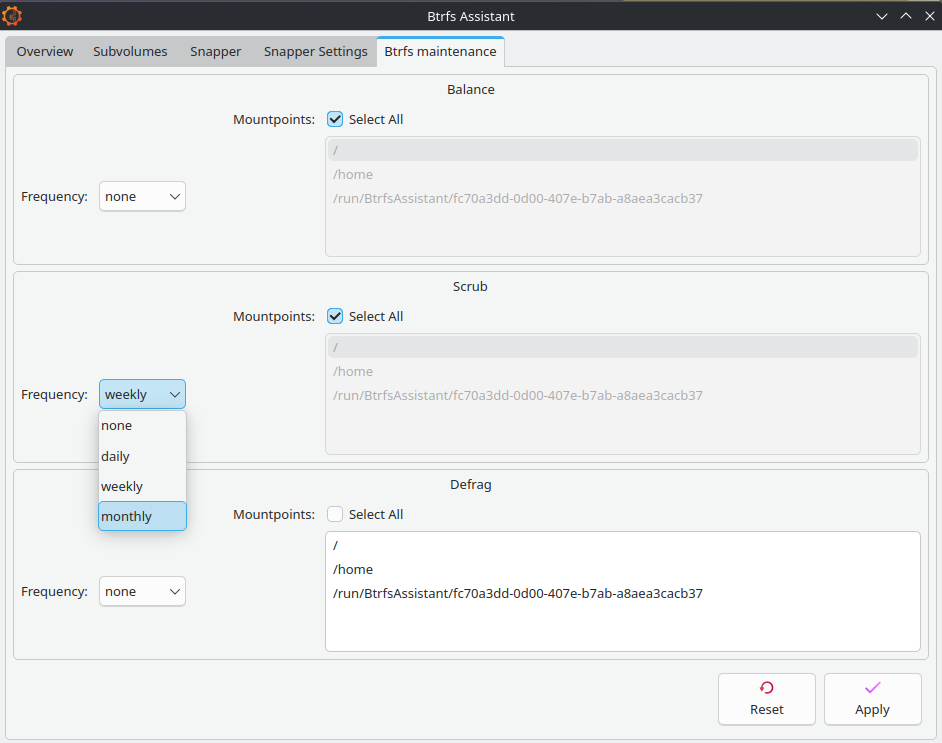
[Editor Note] Also see the addendum in the comments section.
There are some operations that we simply can’t do on an operating system when it’s in use. Instead, we need to use Fedora Media Writer or Gnome Disks to put a downloaded Live ISO onto a USB stick and run things from there. For Disks, right click on the ISO and select open-with Disk Image Writer.
Many of you will be very familiar with this process. But not everybody is aware that many live ISO’s will also allow you to install small amounts of software onto them. This little trick will in fact go on to form a keystone to how we do our system failure recovery.
Downloaded ISO images from https://fedoraproject.org
If preferred, try the Manjaro KDE ISO from https://manjaro.org/products/download/x86 which will also have most of the needed software already there.
The next stage is to get your computer to boot with the USB; you will need to have either already set your UEFI/BIOS to allow a trigger key during initial starting, usually delete, or you will need to go to the OS settings and request a UEFI restart there:
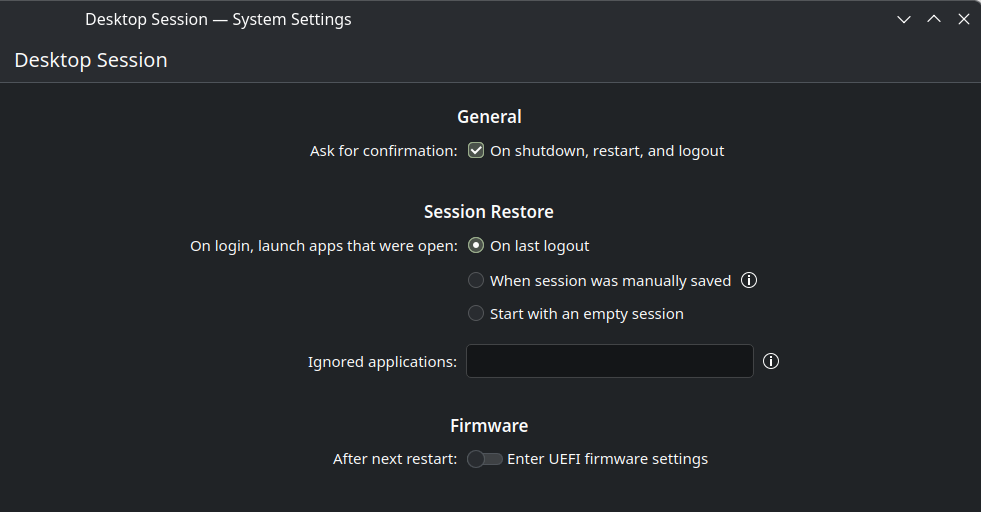
It’s basic standard good practice to have a recent full backup when doing anything to your system.
Once you have booted the live ISO, if you don’t have a backup, then make sure that you do.
Using Disk‘s GUI interface allows the making of partition images to be fairly straight forward. Gnome Workstation ISO’s will already have Disks ready for you to use. If you are using KDE, set it up using KDE Discover. Otherwise use dnf. The installation is just a few MB.
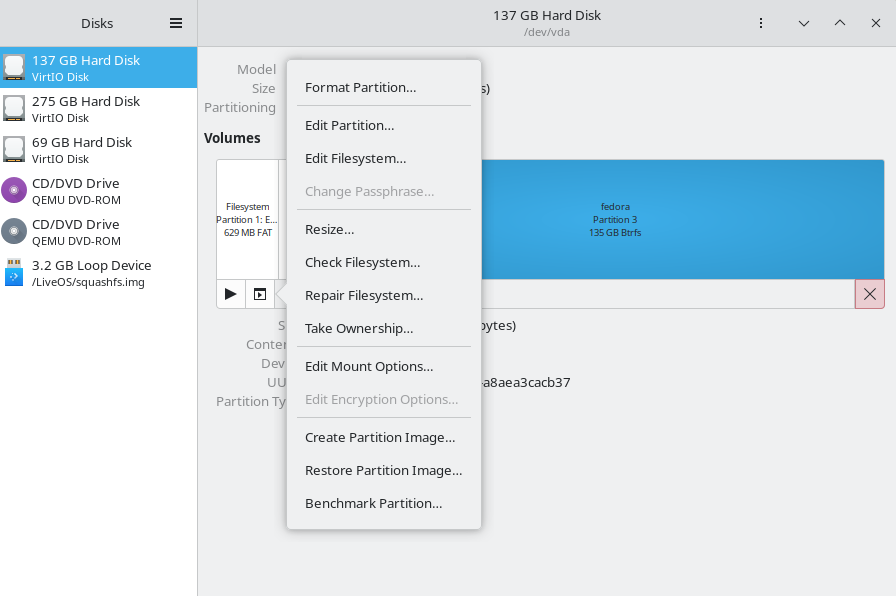
Select the partition, standard click the options button and choose ‘create partition image’.
Backup the boot partitions too. BTRFS makes no copies of these.
The usual cautions if you are thinking of using dd and have never used it before. You need to always pay attention to your input ‘if=’ and your output ‘of=’ or it changes from being a useful disk duplicator into it’s other guise of disk destroyer ….
Also, place your backups on to something reliable. A good quality USB hard-drive is generally viewed as a good choice. They are more resistant to time fading than SSD’s even if they are slower. If you have not heard of ‘bit rot’ there are lots of articles on the web. SSD’s will lose data if they are not regularly powered up.
You may want to consider partition size adjustment at this point. But do the initial backup first, if you can.
Keeping the size of the OS partition reduced down will make backing up much easier. And you are still going to need further full backups, even with Copy On Write running things.
For more experienced users, there are methods to compress partition backups using dd. Also creating a ‘/dev/zero‘ temp file will help compress even more. You can save lots of space but the .img files have to be fully decompressed in order to mount them, which is a slight down side.
Problems with computer speed and with excess data can occur when having a two concurrent CoW systems running together. A kind of snowball effect from the host system continually backing up copies of the other backups.
According to the Qemu docs, when keeping virtual machines on a BTRFS partition it is recommend to use the ‘nocow‘ option to avoid performance issues.
For those of you using Gnome Boxes, which comes pre-installed on Workstation, any adjustment of the config files and VM locations is not needed.
Boxes likes to keep its virtual machines out of view in a hidden home folder called ‘.local/share/gnome-boxes/images’ and it tends to work best when left that way. All the image files will already have had CoW disabled.
I can’t say that I have noticed any significant problems when I have carried out short tests. However, the issue is there nevertheless and a general look on the web will yield some quite lively discussion on the matter.
Advanced users may wish to consider running their VMs on a separate ext4 partition as another option.
The nocow +C flag can be easily checked by using lsattr against the image file, if required.
Fedora Linux now uses the faster and more modern zram system which compresses the RAM data instead of swapping it to storage.
BTRFS snapshotting will not work if traditional swap files are present in the sub-volume.
If you are running short of RAM, your first option should be adjusting the zram allocation ratios. If you still find that you need a swap file, you will need to create a separate sub-volume to contain it.
Having arrived at this point, you should now find this section to be fairly intuitive.
However, do remember to pay attention to root/home continuity. Remember that home will still contain hidden system and config files that are used by programs installed in the root section.
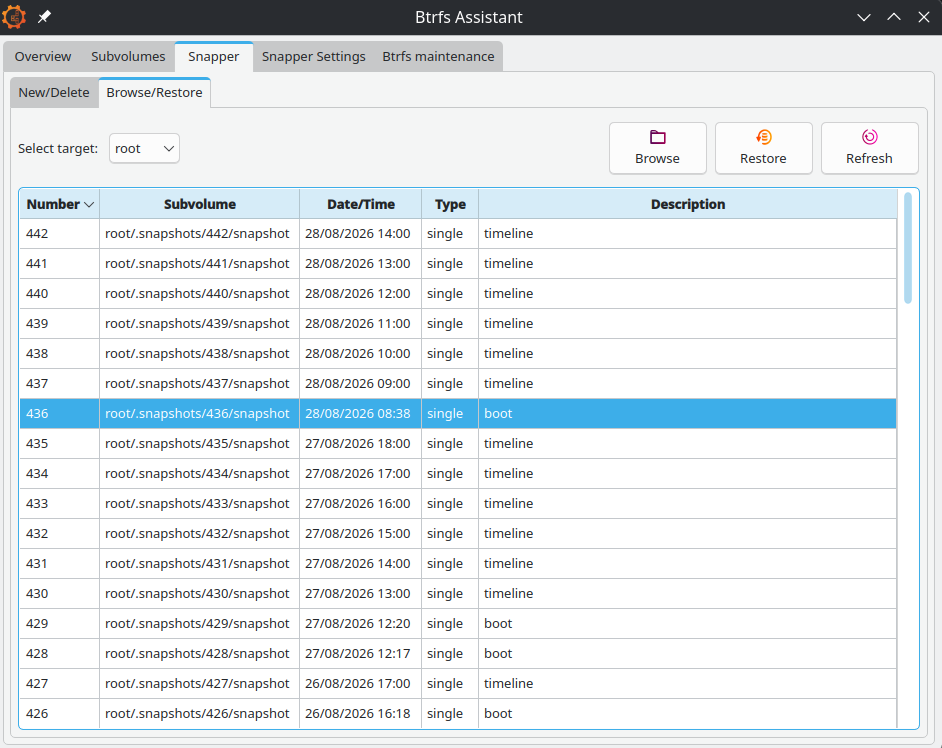
For small problems, where the system still boots, load btrfs-assistant on standard load and roll back to a previous good point.
Importantly, for USB running, start the file manager and mount the partition that you need to fix before installing or running btrfs-assistant or it will fail to work.
In both cases you will be advised to reboot for the request to take effect. The whole process is fairly quick and compared to Timeshift, pretty much instant.
System failure happens to the best of us, given enough time to press enough buttons or to adjust one configuration file too many. But sometimes the failures are caused from upstream, from an unnoticed upstream bug perhaps.
If you are still able to boot into your system, Fedora Linux already features a very quick package reversal system as built-in standard. Sometimes we don’t need to use snapshots at all.
There is a GUI program to run this called dnfdragora:
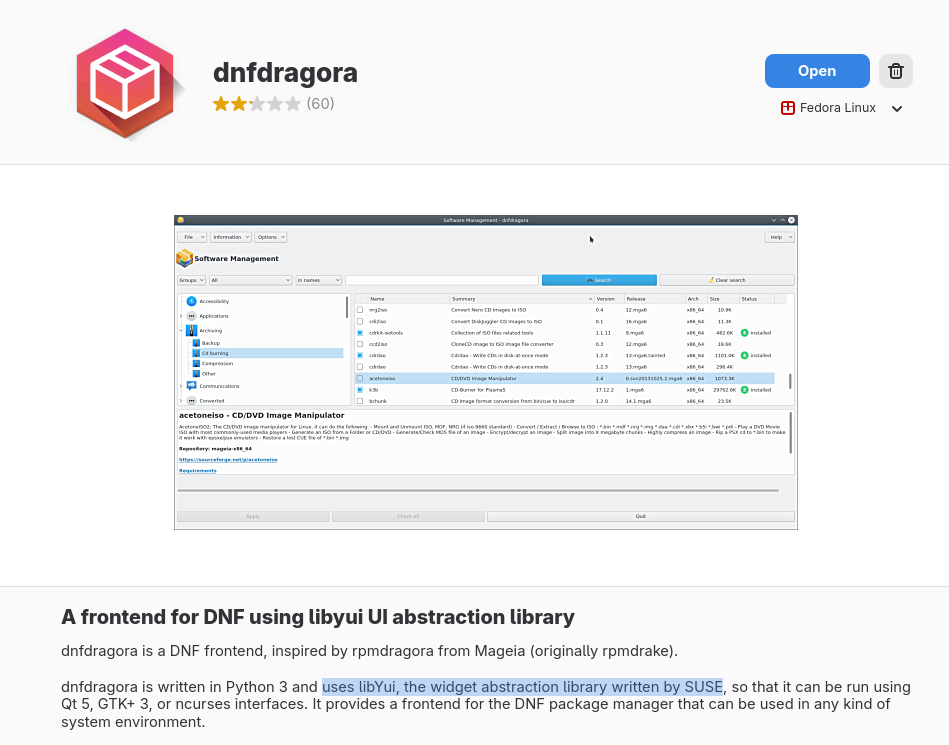
For the sake of completeness, this does need mentioning. However, I would probably argue that in this case the command line is quicker and more intuitive:
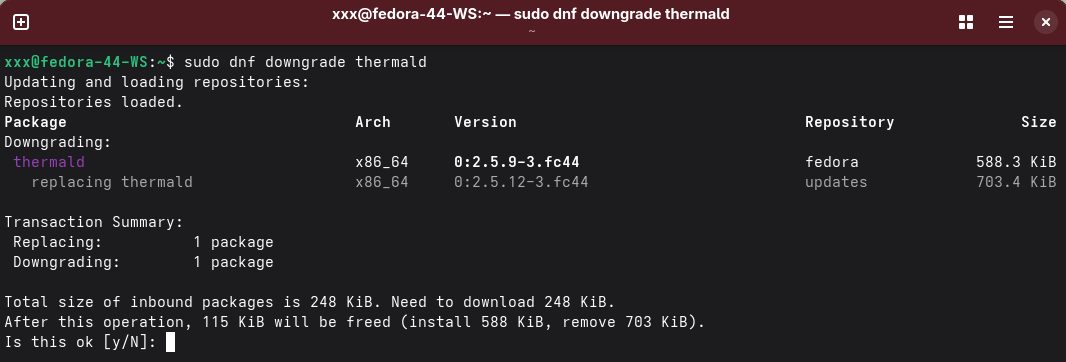
Downgrades work on a simple temporary basis only, so there is no need to re-instate anything at a later stage. When the next batch of updates are available, hopefully with a fix, the package and its associated files become automatically re-upgraded.
This article hopefully updates us to the start of H2 2026.
Should Red Hat support Fedora Linux putting their support behind btrfs-assistant and should we have snapper and snapshots already setup on new installations?
I think the answer to that is yes, and that this is probably going to be happening. But for exactly how and when, we will have to wait to see.
Further improvements will always be in the pipeline.
admin )
on 2026-08-25 12:47:18 UTC
By Ananya Nalavathu and Francois Gonothi Toure
Open source communities run on contribution, and contribution runs on documentation, storytelling, and knowledge sharing. At the Fedora Project, that means the Fedora Community Blog and Fedora Magazine, two publications that give contributors a voice and give the community a way to stay informed, inspired, and connected.
This year, as part of my internship with the Fedora CommOps team at Red Hat Ireland, I got to experience that firsthand. Publishing 11 articles, running editorial campaigns, and coordinating content across sprints gave me a deep appreciation for how much thought goes into keeping Fedora’s editorial standards consistent and how much easier that journey could be for new contributors with the right tool in hand.
That’s exactly what my fellow intern Gonothi built during his Outreachy internship with the Fedora Project. In our final sprint together, we decided to share it with the community because tools that make contributions more accessible deserve to be heard. With that context in mind, I’ll hand over to Gonothi to walk you through what he built and why.
My name is Gonothi, and I’m an Outreachy intern within the Fedora Project. The tool I built is called editorial-guide-ramalama, a Retrieval-Augmented Generation (RAG) assistant that reads Fedora’s actual editorial guidelines and published articles, then checks your draft against them. It tells you whether your article meets the standards and exactly what to fix if it doesn’t.
A regular chatbot would guess. RAG grounds every answer in the actual guidelines. When the tool flags a problem, it cites the specific guideline and gives you an actionable fix. Not “this looks off”- but “your article is missing the Read More tag, which is required per the Magazine guidelines.”
RamaLama is the engine behind the whole tool, and it’s a big part of why this project works the way it does. It runs open models locally as OCI containers, the same container tooling Fedora already uses, so there’s no API key, no external service, and no data leaving the machine, which keeps everything private and fully reproducible. It also has RAG built in: RamaLama handles the ingestion, chunking, and retrieval itself (running Docling internally to parse and chunk the guidelines), so I don’t have to wire together a separate vector pipeline. That combination of local inference, OCI-container packaging, and built-in RAG is what lets the tool ship as a single image that anyone can pull from Quay and run.
The tool supports both Fedora publications, Fedora Magazine and the Fedora Community Blog, each with its own editorial guidelines loaded as the primary source the model checks against. Switch publications in the sidebar, and the guidelines change accordingly.
The stack is built on RamaLama, Docling, Quay, and Streamlit, with small GPT-Generated Unified Format (GGUF) models benchmarked for quality versus size. The pipeline works like this:
Articles are pulled from both publications via the WordPress REST API; no static files are committed, and the corpus is always rebuilt from source and stays reproducible. RamaLama RAG runs Docling internally to parse and chunk the documents into a vector store, packaged as OCI images published to Quay at quay.io/fedora/editorial-guide-ramalama. To run a check, pull the relevant image and use either the Streamlit interface or the terminal; no build step required.
Paste a draft that meets the Magazine’s standards, and the model confirms compliance, citing the relevant guideline. Paste one with known issues, a missing featured image, a missing Read More tag, and it flags each problem with an actionable fix.
One honest note: small local models have limits. editorial-guide-ramalama is great for catching common issues before submission. It is not a replacement for a human editor, and it doesn’t try to be.
What strikes me most about this project is not just what it does technically, but what it represents for contributor onboarding in open source communities. One of the biggest barriers for new Fedora contributors isn’t motivation; it’s knowing the unwritten rules. Editorial guidelines, packaging standards, community norms these exist, but they’re scattered, and learning them through rejection is discouraging.
Tools like editorial-guide-ramalama lower that barrier. They don’t replace human editors or community knowledge; instead, they give new contributors a first pass, a way to self-check before they submit, and a way to learn the guidelines through doing rather than through trial and error. That’s exactly the kind of tooling that makes open source communities more accessible.
This mini-project was the proof of concept that validated the RAG approach for Fedora editorial documentation. The same architecture is now feeding into a larger project applying RAG to RPM packaging guidelines, a higher-stakes domain where grounded, local, open-model AI can help contributors get packaging right.
The code is on the Fedora Forge at ai-ml/editorial-guide-ramalama. Pull the image from Quay and try it on your next draft before you submit.
The tool is live and available now. Pull the image from Quay, paste your draft, and see what it says. If you’re a new contributor, nervous about your first article, this was built for you.
Thank you to the Fedora community, our mentors Justin Wheeler, Dominik Kawka, and Carol Chen, and Outreachy for making this internship possible.
The post Meet editorial-guide-ramalama: An AI Assistant That Checks Your Fedora CommBlog and Magazine Articles Against Editorial Guidelines appeared first on Fedora Community Blog.
admin )
on 2026-08-20 20:00:00 UTC
Fedora Infrastructure team will be applying updates to servers and rebooting them.
Many non-user facing services will be affected, most should only be down for a short time as their particular resources are rebooted HOWEVER some may be down for a non-trivial amount of time due to RHEL-9 to RHEL-10 …
admin )
on 2026-08-19 08:00:00 UTC
After years of technical research and foundational work, the Fedora Badges application service has been rebuilt from the ground up, and it is heading to production. Whether you have been collecting badges for years or you are brand new to the Fedora Project community, here is what is waiting for you there.
The archaic server rendered pages are now gone. The Fedora Badges application service now runs on a modern single page application. This provides you with a much faster and more responsive experience, while functioning across various screen sizes and devices types, all without full refreshes or front-end reloads.
Navigations have been revamped as well. But do not worry at all – if you have bookmarked any old service links, they should redirect you to the right place.
You can now customize the look of the Fedora Badges application service choosing from eight colour schemes. Your choice flows through the various elements of the front-end – from navbar to borders, from charts to accents, etc. The dark mode and light mode switch respects your system preference and can also be toggled.
Your choices are persistent across visits residing in your session storage. As long as the same session is used, the colour schemes and dark mode settings stay.
Not only does the profile page show your precious badges, it also shows a radar chart that maps your collection across categories. This is a rudimentary method to gauge your progress and discover the areas you have not explored yet. Giving a means to diversify the activities, this encourages more people to join in.

The refreshed history page also adds a collection time-line chart showing yours (and your friends’) contribution activities over months and years at a glance.
The renewed difference page lets you compare your badges collection with those of your friends’ possessions. See which badges you both share, which ones only you have, and most importantly, which ones they have earned that you have not yet. It’s a fun way to discover new badges and unearth new ways to contribute.
You can also reach out to your fellow community members for potential mentoring opportunities, based on their contribution activities and collected badges.
Every active badge now has a rarity tier based on how many users currently hold it:
You can now browse active badges by their rarity tiers, making it easy to hunt down the ones that fewer people have earned. Not only does it allow you to find new pathways for contribution, you also get a sense of the impactful work and relevant tracks that are waiting for you in your community activities.
Departing from different searches for badges and users, the search bar now helps unified lookup across both badges and users. Start typing and results start appearing immediately after – with better lookup results. These will appear when the query is general enough to return more than eight results.

To save server resources, the asynchronous search request begins only when at least four characters are entered into the search bar for the query.
Departing from the restricted rankings page, it is now possible to request custom period filtering on the leaderboards page. Filters can be based on days, weeks, months, and years. One can see who has been earning most badges in those times, and generally look back at the community’s evolving progress over a time period.
The rankings are deterministic and can be shared with others, using the sharing link that inherently applies the same filters. This creates a reproducible resource.
Badges can now be manually marked as legacy (retired, unobtainable) after they should no longer be awarded to the users. For instance, the badges for joining the Fedora Linux Release Party 42 should no longer be available to new users in 2026. Hence, they should not be accounted for while computing rarity tiers.
And nope — we are not taking awarded badges away from users who have already earned them. These retired badges are still going to be visible in the history.
You see, the revamp was not just about the front-end. The data layer that powers the application service got a major overhaul as well. The Database Library project, which handles all database operations, saw 105 commits across 7 contributors during the same period, pushing from version 1.4.1 to 1.5.5.
Here’s what changed under the hood, and why it matters to you:
Authentication has been reworked. The old session-based login has been replaced completely with a modern token-based flow using OpenID Connect. The application service now has its own dedicated authentication client so logging in through Fedora Accounts is more consistent across other things.
If you are visiting for the first time, like it has been for years, your user account is automatically created without requiring any further steps.
Email addresses are no longer visible across various API responses. They are hashed before being sent as an asynchronous response, for use by Libravatar. Users have the choice to opt out of the Fedora Badges application service entirely. In that case they will stop receiving badge awards for their community tasks.
RSS feeds are now limited to recent entries for performance and efficiency, so you can still stay informed about the latest incoming activities on the app.
If you are a part of the team, the new interface gives you a full set of tools.
Access control is tiered — community members see the service experience, while authorized team members get the administrative controls they need.
This revamp (codenamed स्वातंत्र्य or Svātantrya) represents a year of active work across the two repositories. These comprised 165 commits in Tahrir and 105 commits in Tahrir API. This occurred after many years of technical research and foundational work resulting in a leaner codebase with a net reduction of 13,320 lines of code.
I mean it when I say, this revamp would have been dead in the water without the help of the following folks (in the alphabetical order):
And those, of course, from Flock 2026’s workshop on the Fedora Badges Revamp Project.
This revamp project was in a development hell for quite some time. It was able to come out of it thanks to those listed above and countless others who have helped maintain the project for the past fourteen years or so. It is now time for me to pass this torch on to others who can help maintain this.
The project codebase currently lives on the Fedora Infrastructure’s GitHub namespace. Please consider providing feedback and contributing changes to help maintain the projects. You can also hang out with us in the Fedora Badges chat room on Fedora Project’s Matrix server to learn more.
The production deployment should be live by the time this article is publicly available. Head over to Fedora Badges to explore the refreshed experience. As it might be a little rough around the edges in the starting days, please bear with us while we hammer down the oddities with your useful reports.
Your input influences what comes next to the Fedora Badges application service. Please consider giving it a try right now and let us know what you think!
admin )
on 2026-08-14 17:22:24 UTC
Fedora 45 has several system-level changes that need testing on real hardware. The first test day up is GNOME 51, starting on 17 August, with more events planned for RPM 6.1, installation media and others. You can participate with a VM for most tests; some hardware-specific testing is more useful on a real machine.
Details are contained in this article.
Fedora 45 is bringing several changes that deserve testing beyond CI and automated test suites. Here are some of the bigger ones:
Automated tests catch regressions in known scenarios, but they won’t tell us if the new boot.iso works on your particular laptop, or if enforced RPM signature checking breaks a workflow nobody on the team thought of. We need people trying this on real machines and in real scenarios.
That’s what test days are for. A few days focused on a specific change, developers on Matrix to help debug, and anyone can show up and run through the test cases. You don’t need to be a Fedora QA expert. If you can install Fedora, reproduce a problem and report what happened, you can help.
At our July 20 Quality meeting (transcript), we went through the ChangeSet and picked out the changes that would benefit most from community testing. That turned into a planning ticket on Forge with individual tickets for each event.
GNOME 51 Desktop — August 17-21 is the first test day this cycle and it’s happening right now . Desktop, graphics, peripherals, core applications. If you’re reading this in time, jump in. (#GNOME_51_Desktop)
I18n test week —September 7-13 input methods, locales, keyboard layouts. . (#924)
RPM 6.1 — NSS support for user/group lookups is back, queries work again during transactions, new macro modifiers for packagers, and better rpmkeys verification output. Looks like a smooth update, but RPM touches everything — worth making sure nothing slipped through. (#917)
Installation media — boot.iso and live images, physical hardware, VMs. Try booting the new images on whatever hardware you have. Does the installer work? Does the live environment behave? (#918)
KDE — likely KDE 6.7. (#922)
Cockpit — it’s been years since the last Cockpit test day. (#920)
GRUB EFI / Confidential Computing — relevant mainly to specific hardware and VM environments. (#919)
The list isn’t final. We’re still looking at kmscon, OpenSSL 4.0, CoreOS, and Kernel 7.2. Keep an eye on testdays.fedoraproject.org for the current schedule.
Try upgrading your system to the latest packages. Boot the new boot.iso on physical hardware. Test suspend/resume, Wi-Fi, external displays, NVIDIA/AMD/Intel graphics, or whatever hardware you actually use. Each test day has a wiki page with specific test cases, but your own daily workflows are often where the interesting bugs hide.
You need a Fedora Account to report results. Pick a test day from the schedule, follow the wiki instructions, report through the test day app, and if you find something odd, come talk to us on Matrix in #test-day:fedoraproject.org.
The test day app itself is open source at quality/testdays-web on Forge. If something about it bugs you or you have an idea, file a ticket.
This doesn’t all have to come from us. If you maintain a package with a big change in F45, or you see something in the ChangeSet that you think needs broader testing — propose a test day. Create a ticket at forge.fedoraproject.org/quality/tickets, tag it “test days”, and tell us what you’d like to test. You don’t need test cases or wiki pages ready. The QA team will help with that.
Test days are focused events around specific changes, but testing Fedora is something you can do any day. fedora-easy-karma is a CLI tool that picks up testing updates already installed on your system and lets you submit karma to Bodhi right from your terminal. See the installation instructions to get started. Like the test day app, it’s an open source project hosted on Forge — feel free to report issues or suggest features.
Catch you in #test-day on Matrix.
Note about AI usage: I wrote this article myself. I used Claude (Anthropic) to significantly refine the grammar, wording, and sentence structure; the technical content and all claims are my own.
This outage impacts the copr-frontend and the copr-backend.
admin )
on 2026-08-11 14:00:00 UTC
Fedora 45 Mass Branching is currently in progress. Koji is unavailable for the duration of this process.
Once Mass Branching is complete, Rawhide will advance to Fedora 46, Koji will be re-enabled, and an announcement email will be sent to devel-announce@lists.fedoraproject.org.
If you are interested in following …
admin )
on 2026-08-10 08:00:00 UTC
You wake up one morning to find your home server unresponsive, after some investigation you discover a failed NVMe drive taking your self-hosted services and data with it. Perhaps you’re a system administrator and a workstation’s SSD has been silently accumulating errors for months, and now a user is reporting corrupted files.
Drive failures are rarely instant, they give subtle warnings (through rising temperatures, increasing error counts, and wear indicators) but only if you’re watching. Most people will only check on disk health after problems start, by then it may be too late.
Performance Co-Pilot (PCP) is an open source framework for collecting, monitoring, and analyzing system performance metrics. Recent updates have expanded its drive monitoring capabilities with:
In this post, you’ll set up PCP drive monitoring on Fedora, learn which metrics matter most, and build a Grafana dashboard to visualize your drive health over time.
To follow along, you’ll need:
You can verify smartmontools is available:
$ rpm -q smartmontools
If it’s not installed:
$ sudo dnf install smartmontools
SMART (Self-Monitoring, Analysis and Reporting Technology) is a monitoring system built into modern hard drives, SSDs and NVMe devices. SMART continuously tracks indicators like wear leveling, error rates, temperature and power-on hours. These are reliability metrics that can help point towards impending failures.
Most people only check SMART data once, using tools like smartmontools (smartctl -a /dev/sda) and only when they already suspect a problem. That approach only gives you a single snapshot. PCP takes a different approach: its SMART agent collects these metrics continuously in the background, building historical trends that you can analyze.
Did your drive’s temperature spike yesterday during a large file transfer? Has your NVMe wear indicator increased from 5% to 15% over the past six months? Continuous monitoring catches these patterns. Drive failures rarely happen without warning, clues are given through SMART values that shift over time.
Getting started is straightforward. Install the required packages:
$ sudo dnf install pcp pcp-pmda-smart
The pcp-pmda-smart package provides the SMART monitoring agent. Next, install the PMDA (Performance Metrics Domain Agent):
$ cd /var/lib/pcp/pmdas/smart/
$ sudo ./Install
The installer will prompt for configuration options. The defaults work well for most setups, so press Enter to accept them.
Start and optionally enable the PCP collector daemon:
$ sudo systemctl start pmcd
$ sudo systemctl enable pmcd
Verify the SMART metrics are available:
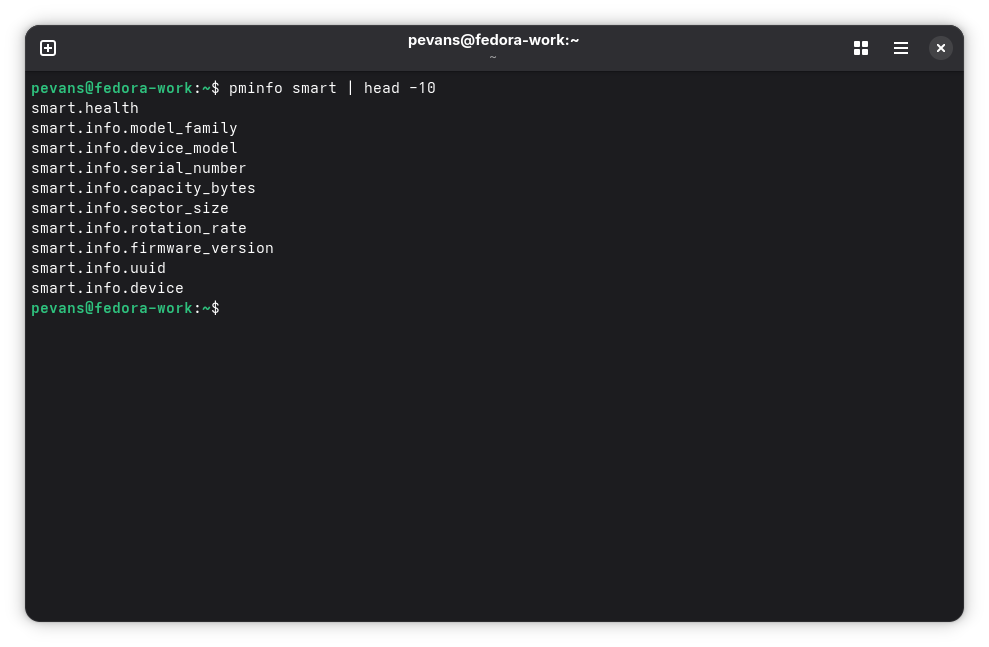
If you see metrics listed, you’re ready to go.
Now that monitoring is running, let’s look at the metrics that matter most.
Drive temperature is one of the easiest health indicators to track. Query it with:
$ pminfo -ft smart.attributes.temperature_celsius.value
For NVMe drives, use:
$ pminfo -ft smart.nvme_attributes.temperature_sensor_one
As a general guideline: sustained temperatures above 60 °C for HDDs or 70 °C for SSDs and NVMe drives indicate potential cooling problems. Consistent high temperatures accelerate wear and reduce drive lifespan.
To watch temperatures update in real time (every 5 seconds):
$ pmrep -t 5s smart.nvme_attributes.temperature_sensor_one smart.attributes.temperature_celsius.value
Press Ctrl+C to stop.
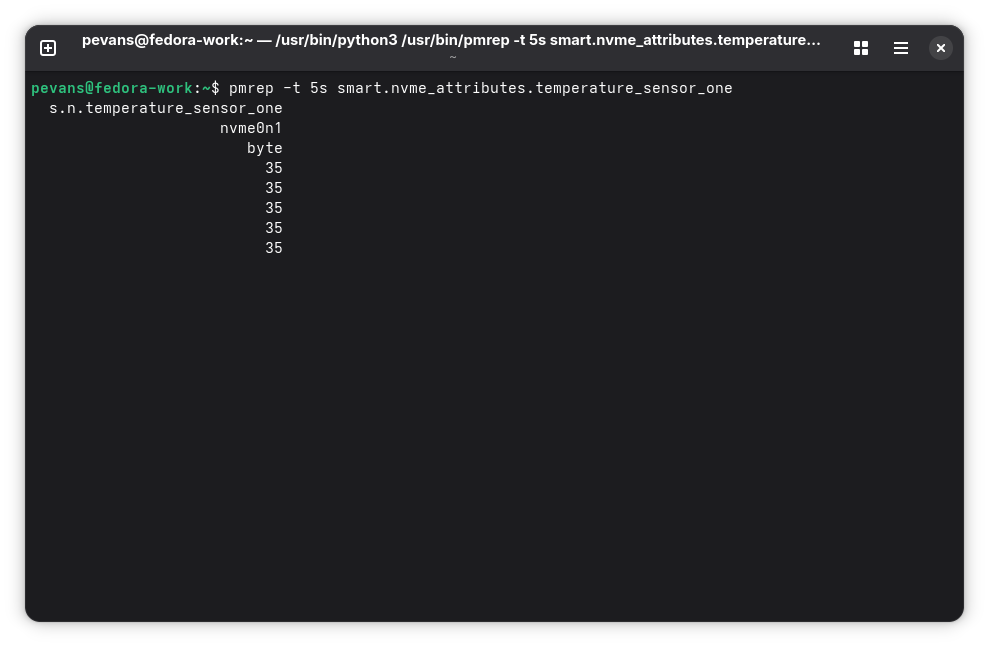
Every drive has a finite lifespan. These metrics help you track where a drive is in its lifecycle.
Power-on hours tracks total runtime:
$ pminfo -ft smart.attributes.power_on_hours.value
$ pminfo -ft smart.nvme_attributes.power_on_hours          # NVMe
A drive with 50,000 hours (roughly 5.7 years of continuous operation) is significantly older than one with 5,000 hours.
Power cycle count shows how many times the drive has been powered on and off:
$ pminfo -ft smart.attributes.power_cycle_count.value
$ pminfo -ft smart.nvme_attributes.power_cycles             # NVMe
Excessive power cycling can accelerate mechanical wear in HDDs and contribute to flash cell wear in SSDs.
For NVMe drives, smart.nvme_attributes.percentage_used is the most important wear metric. It runs from 0 to 100%, reflecting the drive’s consumed endurance. Above 80% means significant wear. Above 90%, start planning a replacement.
$ pminfo -ft smart.nvme_attributes.percentage_used
These are the metrics you hope stay at zero. Any non-zero value or an increasing trend points to physical drive problems.
Reallocated sector count shows bad sectors that the drive has detected and remapped to spare areas. Modern drives reserve sectors for this purpose but once remapping starts it signals deteriorating media:
$ pminfo -ft smart.attributes.reallocated_sector_count.value
Current pending sector count tracks sectors waiting to be remapped. A non-zero value suggests the drive is actively struggling with bad areas:
$ pminfo -ft smart.attributes.current_pending_sector.value
For a quick overview of all drives at once:
$ pmrep -s 1 smart.health smart.attributes.temperature_celsius.value smart.nvme_attributes.temperature_sensor_one smart.nvme_attributes.percentage_used
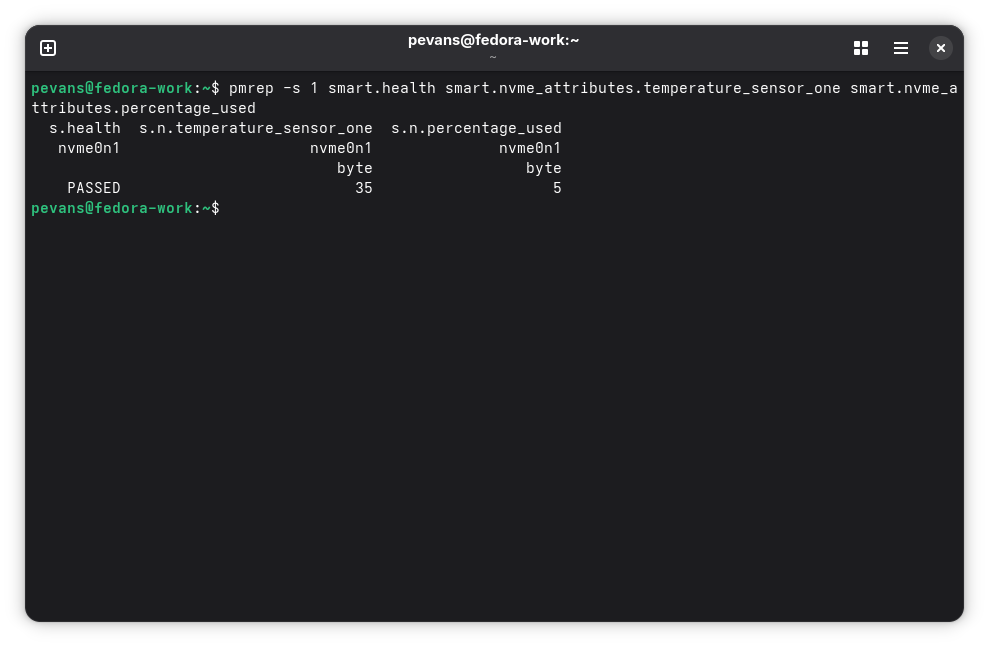
A common challenge with drive monitoring is that device names can change. Your NVMe drive might be /dev/nvme0n1 today but after a reboot or BIOS update it could become /dev/nvme1n1. Hot-plugging USB drives or adding new storage can also shuffle device assignments.
PCP solves this with the smart.wwid.* metric namespace. WWID (World Wide Identifier) is a unique identifier assigned to each drive during manufacturing. It never changes regardless of how the operating system names the device.
Here’s the difference in practice:
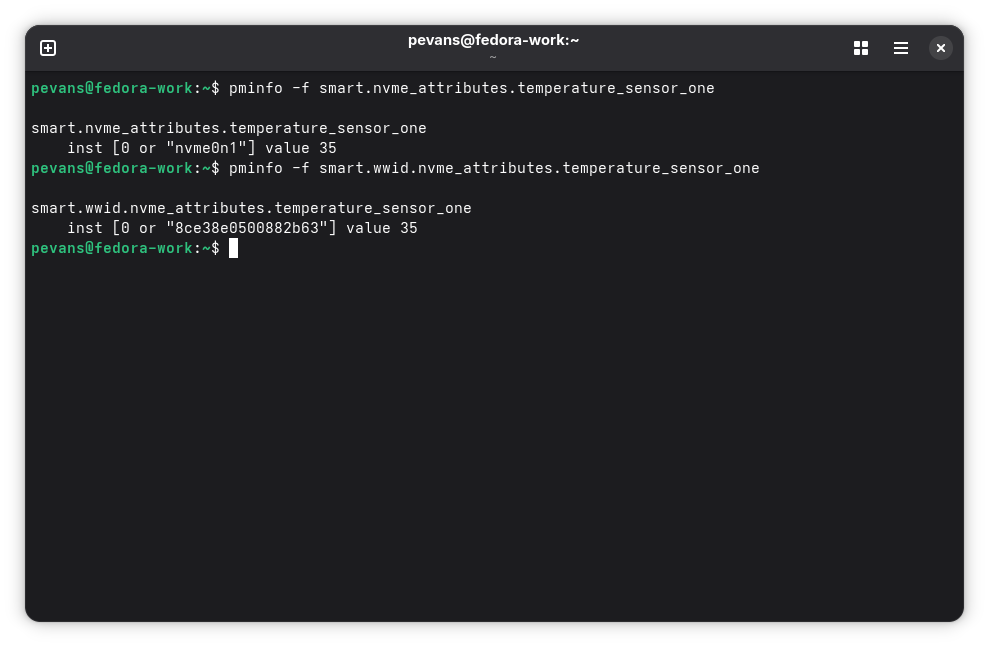
The WWID-based namespace is particularly useful for multi-drive setups (home lab servers, workstations with external drives, or laptops with docking stations). Your monitoring history stays consistent even when device names don’t.
Beyond standard SMART attributes, NVMe drives maintain a detailed error log (log page 0x01) that records every error event the drive encounters. The SMART PMDA can collect and decode these logs giving you visibility into issues that basic SMART counters won’t reveal.
While smart.nvme_attributes.media_and_data_integrity_errors gives you a count, the error log tells you what happened, when it happened, and where on the drive it occurred. Each log entry includes:
This level of detail helps diagnose intermittent problems. Maybe your NVMe drive only throws errors under specific workloads or errors cluster in a particular address range.
Query the error log metrics:
$ pminfo -ft smart.nvme_error_log
The most important metric is smart.nvme_error_log.error_count which should be zero on a healthy drive. If you see non-zero values, check smart.nvme_error_log.status_code for human-readable error descriptions. Common error codes include:
Recurring errors, especially with the same status code or affecting the same LBA range indicate a real problem that needs attention.
If you have Seagate drives, PCP offers additional monitoring through the FARM (Field Accessible Reliability Metrics) PMDA. FARM is Seagate’s extended monitoring that goes beyond standard SMART, providing deeper insights into drive behavior.
FARM logs capture operational data that SMART doesn’t track:
FARM support works for both SATA and SAS Seagate drives. Install and enable it:
$ sudo dnf install pcp-pmda-farm
$ cd /var/lib/pcp/pmdas/farm/
$ sudo ./Install
Query available FARM metrics:
$ pminfo farm | head -10
farm.smart_attribute.power_on_hours
farm.environment.current_temperature
farm.reliability.uncorrectable_read_errors
farm.reliability.uncorrectable_write_errors
...
FARM is especially useful for tracking long-term health trends, diagnosing subtle issues not visible in basic SMART data and verifying that drive specifications match actual usage.
Note: FARM metrics are Seagate-specific. They won’t work with Western Digital, Samsung, or other manufacturers. For universal monitoring use the SMART PMDA covered earlier.
PCP integrates with Grafana through the grafana-pcp plugin, letting you build dashboards that visualize drive health over time. This is where continuous monitoring pays off. You can spot trends, set up alerts and keep an eye on your entire fleet of drives from a single dashboard.
Install Grafana and the PCP plugin:
$ sudo dnf install grafana grafana-pcp
Start the required services:
$ sudo systemctl start grafana-server pmproxy
$ sudo systemctl enable grafana-server pmproxy
Open Grafana in your browser at http://localhost:3000 (default credentials: admin/admin).
Before adding a datasource, you may need to enable the Performance Co-Pilot plugin. Go to Administration > Plugins and data > Plugins, search for Performance Co-Pilot, and click Enable. If the plugin is already enabled, you can skip this step.
Go to Connections > Data sources > Add data source and select PCP Vector. The only required field is the URL:
http://localhost:44322
Click Save & Test to verify the connection.
Below are panel configurations you can use in your dashboards. To add a panel, click Add > Visualization on any dashboard, select the PCP Vector datasource and enter the metric name in the query field.
Drive temperature timeseries panel:
This panel shows drive temperature over time, with color thresholds for warning levels.
{
  "type": "timeseries",
  "title": "Drive Temperature",
  "datasource": {
    "type": "pcp-vector-datasource",
    "uid": "PCP_VECTOR"
  },
  "targets": [
    {
      "expr": "smart.nvme_attributes.temperature_sensor_one",
      "format": "time_series"
    },
    {
      "expr": "smart.attributes.temperature_celsius.value",
      "format": "time_series"
    }
  ],
  "fieldConfig": {
    "defaults": {
      "unit": "°C",
      "thresholds": {
        "mode": "absolute",
        "steps": [
          { "color": "green", "value": null },
          { "color": "yellow", "value": 50 },
          { "color": "orange", "value": 60 },
          { "color": "red", "value": 70 }
        ]
      },
      "custom": {
        "thresholdsStyle": { "mode": "area" }
      }
    },
    "overrides": [
      {
        "matcher": { "id": "byType", "options": "number" },
        "properties": [
          { "id": "unit", "value": "°C" }
        ]
      }
    ]
  },
  "gridPos": { "h": 8, "w": 24, "x": 0, "y": 0 }
}
NVMe wear percentage gauge panel:
A gauge showing how much of each NVMe drive’s endurance has been consumed.
{
  "type": "gauge",
  "title": "NVMe Wear Level",
  "datasource": {
    "type": "pcp-vector-datasource",
    "uid": "PCP_VECTOR"
  },
  "targets": [
    {
      "expr": "smart.nvme_attributes.percentage_used",
      "format": "time_series"
    }
  ],
  "fieldConfig": {
    "defaults": {
      "unit": "percent",
      "min": 0,
      "max": 100,
      "thresholds": {
        "mode": "absolute",
        "steps": [
          { "color": "green", "value": null },
          { "color": "yellow", "value": 50 },
          { "color": "orange", "value": 80 },
          { "color": "red", "value": 90 }
        ]
      }
    },
    "overrides": [
      {
        "matcher": { "id": "byType", "options": "number" },
        "properties": [
          { "id": "unit", "value": "percent" }
        ]
      }
    ]
  },
  "gridPos": { "h": 6, "w": 8, "x": 0, "y": 8 }
}
Drive health status panel:
A stat panel showing the overall health assessment for each drive.
{
  "type": "stat",
  "title": "Drive Health Status",
  "datasource": {
    "type": "pcp-vector-datasource",
    "uid": "PCP_VECTOR"
  },
  "targets": [
    {
      "expr": "smart.health",
      "format": "time_series"
    }
  ],
  "fieldConfig": {
    "defaults": {
      "unit": "string",
      "mappings": [
        {
          "type": "value",
          "options": {
            "PASSED": { "text": "PASSED", "color": "green" },
            "FAILED": { "text": "FAILED", "color": "red" }
          }
        }
      ]
    },
    "overrides": [
      {
        "matcher": { "id": "byType", "options": "string" },
        "properties": [
          { "id": "unit", "value": "string" }
        ]
      }
    ]
  },
  "gridPos": { "h": 6, "w": 8, "x": 8, "y": 8 }
}
A complete, importable Grafana dashboard JSON file is provided alongside this post as pcp-drive-monitoring-dashboard.json. Import it via Dashboards > Import in Grafana.

PCP includes pmie (Performance Metrics Inference Engine), a rule-based tool that evaluates metric expressions and triggers actions when conditions are met. Where Grafana dashboards require someone to be watching pmie can alert you automatically.
To start and optionally enable pmie:
$ sudo systemctl start pmie
$sudo systemctl enable pmie
Before writing alerting rules you can use pmie in verbose mode to view metrics from the command line. This is a useful way to get familiar with the syntax:
$ echo 'temp_check = smart.nvme_attributes.temperature_sensor_one;' | pmie -e -v -t 5second
temp_check (Mon Jun 30 10:15:01 2026): 35

temp_check (Mon Jun 30 10:15:06 2026): 35

temp_check (Mon Jun 30 10:15:11 2026): 36
Press Ctrl+C to stop. The -e flag shows the evaluated expression, -v shows values even when no action fires, and -t sets the evaluation interval.
You can add conditions and actions to turn this into a rule. Here’s an example that prints a message whenever an NVMe drive’s temperature is above 0 (effectively showing all drives):
$ echo 'temp_check = some_inst(smart.nvme_attributes.temperature_sensor_one > 0) -> print "NVMe temp:" " %i:%v";' | pmie -e -v -t 5second
Mon Jun 30 10:15:01 2026: NVMe temp: nvme0n1:35
temp_check (Mon Jun 30 10:15:01 2026): true

Mon Jun 30 10:15:06 2026: NVMe temp: nvme0n1:36
temp_check (Mon Jun 30 10:15:06 2026): true
The %i token expands to the instance name (the drive) and %v to the metric value.
Now let’s create practical rules that alert on real problems. Save the following to /etc/pcp/pmie/smart-health.pmie:
// Alert if any NVMe drive temperature exceeds 70 °C
some_inst(smart.nvme_attributes.temperature_sensor_one > 70)
    -> syslog 10 min "NVMe drive temperature critical:" " %i at %v °C";

// Alert if any NVMe drive wear level exceeds 80%
some_inst(smart.nvme_attributes.percentage_used > 80)
    -> syslog 24 hour "NVMe drive wear level high:" " %i at %v%";

// Alert if any drive has reallocated sectors
some_inst(smart.attributes.reallocated_sector_count.value > 0)
    -> syslog 24 hour "Drive has reallocated sectors:" " %i with %v sectors";
The syslog action writes to the system log with the tag pcp-pmie. The time after syslog (e.g., 10 min, 24 hour) is a throttle that prevents repeated alerts, so you won’t flood your logs if a condition stays true.
Test your rules from the command line first:
$ sudo pmie -v -c /etc/pcp/pmie/smart-health.pmie -t 10second
This evaluates the rules every 10 seconds and prints verbose output so you can see them firing. Once you’re happy with the rules you can run pmie as a persistent service. The system-wide pmie instance is managed by pmie_check and configured in /etc/pcp/pmie/control. Add an entry pointing to your rules file to have them evaluated continuously alongside the default PCP rules.
A complete smart-health.pmie rules file covering temperature, wear and error alerts for both NVMe and SATA drives is provided alongside this post in the conclusions section. Copy it to /etc/pcp/pmie/ to get started.
Other actions are available beyond syslog. Use shell to run arbitrary commands (such as sending an email or desktop notification), print for stdout output or chain actions with & to run multiple actions when a rule fires.
pmlogger is a core utility included with PCP, and automatically logs metrics when running. To start it and enable it on boot:
$ sudo systemctl start pmlogger
$ sudo systemctl enable pmlogger
By default, pmlogger captures a broad set of system metrics. To ensure SMART drive metrics are included, run:
$ sudo pmlogconf -r /var/lib/pcp/config/pmlogger/config.default
When prompted, enable the S.M.A.R.T drive statistics [Linux] group. This ensures drive health metrics are captured continuously, allowing you to review historical trends using tools like pmchart, pmrep, or Grafana with the PCP Valkey datasource.
With pmlogger running, you build a historical record of your drive health. If a drive starts failing in six months, you can look back and see exactly when the warning signs began.
Drive failures give warnings, through SMART metrics, error logs and performance degradation. With PCP’s drive monitoring capabilities you have the tools to catch these warnings before they become data loss.
In this post we covered setting up the SMART PMDA for universal drive health monitoring, interpreting key metrics like temperature, wear levels, error counts and tracking drives reliably with WWID-based identifiers. NVMe users can go deeper with error log collection and Seagate drive owners have access to extended FARM telemetry. Combined with Grafana dashboards and pmlogger you get continuous visibility into your drives’ health.
The key takeaway: continuous monitoring catches trends that one-time checks miss. A few minutes of setup today can save hours of recovery work (or worse, unrecoverable data loss) tomorrow.
For more information, visit the Performance Co-Pilot documentation and the grafana-pcp plugin documentation. The Grafana dashboard used in this post is available to download here and can be imported via Dashboards > Import in Grafana. The pmie alerting rules are also available to download here and can be copied to /etc/pcp/pmie/ for use with pmie.
admin )
on 2026-08-05 12:00:00 UTC
The fedora-scm-requests ticket queue is being migrated from pagure.io/releng/fedora-scm-requests to forge.fedoraproject.org/releng/fedora-scm-requests.
As part of this migration, fedpkg has been updated to file new requests against Forgejo instead of Pagure. Toddlers, the automation that processes these requests and performs the actual dist-git operations (creating …
admin )
on 2026-08-05 08:00:00 UTC
Running Large Language Models (LLMs) locally has become increasingly popular for development, privacy, and offline testing. Ollama makes this incredibly straightforward, allowing you to run models like Llama 3 or Mistral directly on your machine.
By leveraging Podman on Fedora Linux, you can isolate Ollama inside a container. This approach keeps your host system clean while making it effortless to spin up, manage, and tear down your AI development environment.
Ollama is an open-source framework designed for running, creating, and sharing large language models. It packages model weights, configuration, and data into a unified management system. Running it inside a container means you don’t have to deal with complex local dependencies, Python environments, or complex GPU driver configurations on your base OS.
Podman is available by default in Fedora Workstation. It can be easily install, if missing, using DNF:
$ sudo dnf install podman -y
For Fedora Linux Silverblue users, Podman is natively available in the immutable base system and no extra steps are necessary.
To verify your installation and ensure everything is running smoothly, execute a quick check:
$ podman --version
LLM weights can be huge—often ranging from 4 GB to over 40 GB, depending on the model size. To avoid downloading these models every time you restart your container, create a persistent Podman volume to store them safely on your host disk:
$ podman volume create ollama_storage
Next, spin up the Ollama container. The following command pulls the official image, attaches the volume we just created, and maps the communication port (
$ podman run -d \
  -v ollama_storage:/root/.ollama \
  -p 11434:11434 \
  --name ollama \
  ollama/ollama
The command above runs Ollama using your CPU. If you are on Fedora Workstation or Silverblue and want to pass through an Nvidia GPU for fast hardware acceleration, make sure you have the Nvidia Container Toolkit installed and append the GPU flag:
--device nvidia.com/gpu=all
With the container running in the background, you can interact with it using Podman’s execution command. Let’s pull and run Llama 3, a highly capable, lightweight model perfect for local development:
$ podman exec -it ollama ollama run llama3
The first time you execute this, Podman will download the model weights into your
>>> Send a message (/? for help)
>>> Tell me a fun fact about Fedora Linux.
Fedora Linux is named after the iconic felt hat worn by the Red Hat shadowman logo! It started as a community project to provide extra packages for Red Hat Linux.

>>>
To exit the interactive prompt, simply type /exit.
Because we mapped port 11434 to our host system, you can also interact with your local Ollama instance via its built-in REST API. Open a standard terminal window and send a curl request:
curl http://localhost:11434/api/generate -d '{
  "model": "llama3",
  "prompt": "Why use containers?",
  "stream": false
}'
This returns a structured JSON payload containing your answer, allowing you to easily hook your local model up to web apps, scripts, or IDE extensions.
To monitor your running local AI instance, use the classic Podman management commands, perhaps starting with:
$ podman ps
You can also inspect the logs to make sure the API server is listening properly:
$ podman logs ollama
When you are done with your development session and want to free up system memory, stop the container:
$ podman stop ollama
If you ever need to completely remove the container environment, use:
$ podman rm ollama
Note: Your downloaded models are completely safe inside the ollama_storage volume and will instantly reattach the next time you spin up the container.
Using Podman to manage Ollama on Fedora Linux or Fedora Silverblue offers a clean, containerized way to build and test applications with LLMs completely offline. It bypasses host environment pollution, isolates large model storage cleanly into a named volume, and treats your AI stack exactly like any other microservice.
 You visited FrOSCon 2026
admin )
on 2026-08-03 08:00:00 UTC
You visited FrOSCon 2026
admin )
on 2026-08-03 08:00:00 UTC
Flock 2026 was my first Fedora conference, and it won’t be my last. I came home with new ideas, new friendships, and even a new project to work on for next year.
I want to start by appreciating the Flock organizers and volunteers. Putting together an event like this takes a lot of quiet, unglamorous work, and it showed in how smoothly everything ran. Thanks for that!
I’d also like to thank the event sponsors. Their support makes it possible for contributors from all over the world to come together, learn from one another, and strengthen the Fedora community.
I also want to appreciate my mentor, Jona, for pushing and supporting me until I finally made it. And a big thank you to Fedora for the sponsorship that got me there.
This year I also got to be part of the Mentor Summit organizing team myself and helped put together the very sessions I used to just attend as a newcomer. Full circle moment here 
It has always felt rewarding to contribute to something I love, and Fedora has always been one of my favorite communities. Along the way, I’ve made great friends and met many wonderful people.
Finally, I’d like to thank the Nairobi GNU/Linux Users Group for supporting Fedora’s Recognition Program this year by sponsoring the trophies and keychains. It was great to see our local community play a part in recognizing Fedora contributors, and I hope it’s the beginning of a lasting tradition.
Our winners this time were; Fabio Valentini, Justin Forbes and Ankur Sinha in that order. Congratulations to you, and keep going You might want to hear from them in our podcast Fedora Contributor Recognition Program 056.
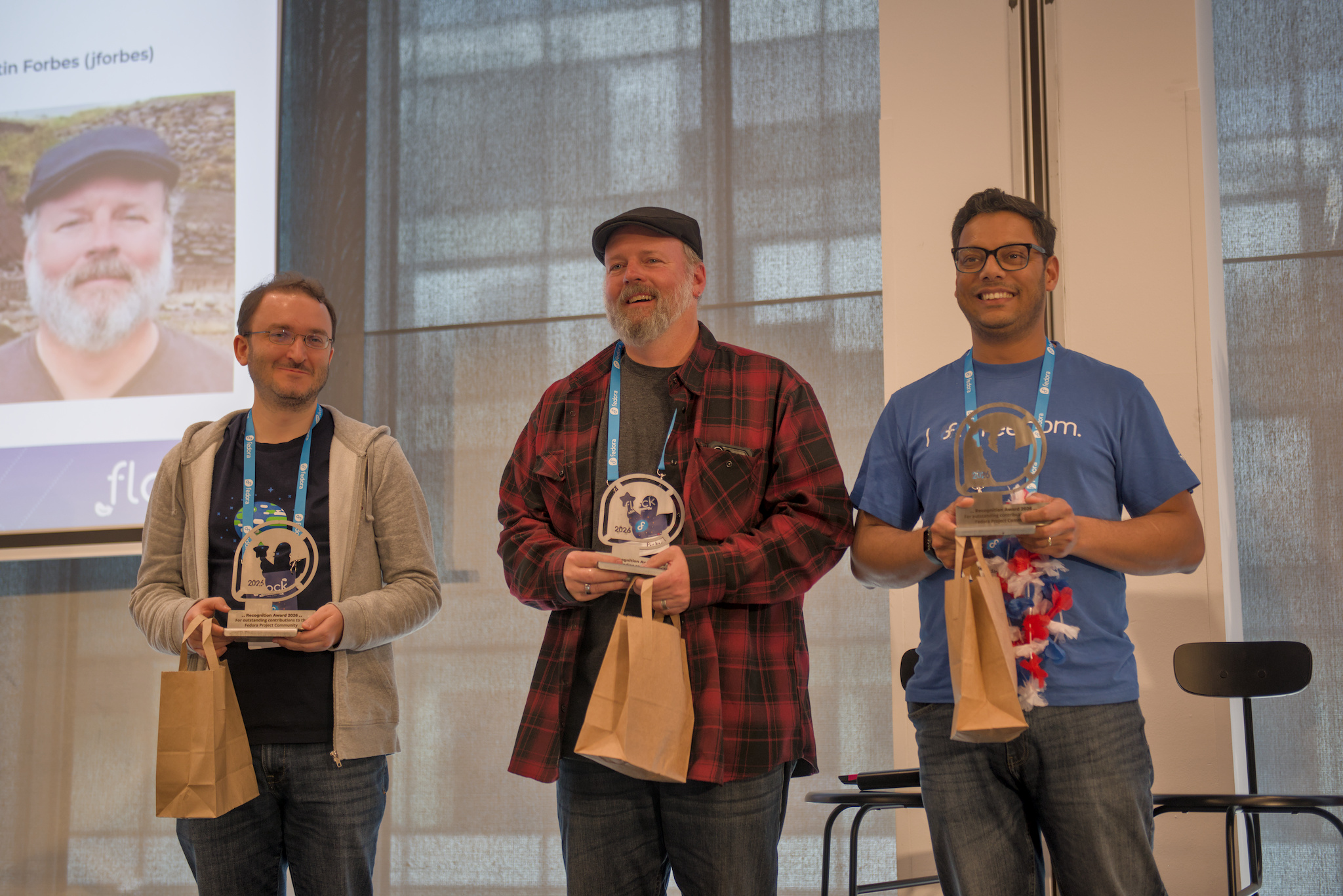
I love how Fedora is so supportive of people from under-represented groups. Being at Flock felt like a reward for the work I’ve been doing with the community too – I had been organizing and mentoring from home. Being there in person and seeing that my work was appreciated meant a lot.
This is what I love about Fedora: it’s welcoming, and it lives by the Four Foundations every day.
I also believe the in-person inclusive checklist I worked on last year helped make this year’s event a success. I loved the venue – I guess that’s why we went back to the same place as last year.
Honestly, I’d say everything was perfect. So hey, Flock organizers – the venue was perfect.
There was so much to take in: design, the mentor summit, docs and the docs initiative, lessons from FOSDEM and SCaLE, and so much more.
There was also the fbrnch workshop, Fedora data and analytics, and honestly too many good sessions to list them all here.
If there’s one thing I keep learning about this community, it’s that nothing happens unless you ask. People, or I would say, I personally don’t wait to be picked here, I just find ways to engage, go deep, and just ask, ask, ask. I wanted to help with speaker logistics this year for Fedora Linux 44 release party, so while I was checking open tickets, I found it and asked if I could manage it. And I did it. I know some people might hesitate to just raise their hand like that, but Fedora is always welcoming, and honestly, we can always use the support. Get involved, it feels good to contribute to something you love.
Funny enough, a friend paid me a compliment (I think?) that I know how to navigate open-source communities and always find something to do. I’m still not sure if that’s just a “community person” thing, or if it’s because I genuinely like understanding people and learning new things. Maybe both.
The candy swap – I totally loved this! Super awesome idea. Sorry to disappoint that I couldn’t find time to bring anything, but I promise I will next time.
This was the 5th edition of the Fedora Mentor Summit, and it packed a lot into a few days. Lunch & Learn sessions ran across all three days, the informal, team-themed gatherings where you could step out of your usual circle and sit with people from Docs, Infra, Marketing, Packaging, Design, wherever you wanted to learn something new. No pressure, just conversation over food.
There was also a sticker-matching icebreaker, and everyone got a Fedora mascot sticker at registration, and the game was to go find your match and have a chat with them about anything open source.
Being on the organizing side of this for the first time gave me a whole new appreciation for how much quiet coordination goes into making something feel effortless for the people attending. Read more about how Mentor Summit came together here.

This is where the real magic happens. Daniel gave a brief, informal talk about eBPF, and honestly, that conversation ended up being one of the best parts of the whole trip.
I got to connect and meet team members, make new friends, and it was exciting just to sit and learn from them in a way a formal talk doesn’t always allow.
And out of that hallway conversation, I actually found another thing to do within Fedora. I have a project I’m hoping to finish and present at the next Flock – mentored by Daniel on eBPF. (Putting this here for accountability, so you can hold me to it.  )
)
I keep meeting super kind, good Fedora friends who are willing to mentor and give their time. It says a lot about how welcoming this community really is.
Everyone I met was kind, and always down to talk about their experiences and their love for open source – and how they hope more people get to know it, try free software, and enjoy it wherever they are, in their own languages. That last part is thanks to the i18n and translation teams across open source communities, doing work that often goes unnoticed.
Being early in my career, of course I had to ask people how they got in. I won’t turn this into a rant, but if I had to summarize the advice: be a problem solver, and contribute to what you believe in – something you enjoy or find genuinely interesting.
*Thanks for reading this far. What’s below isn’t a big deal – just the city.*

I extended my stay by 3 days to explore Prague. I took so many pictures my phone storage nearly gave up on me – I found almost everything lovely and fantastic. I’ll link one of my best shots of the museum and the city below.
Thanks to my friend MatH for being my tour guide!
I totally loved it. It says something that the organizers knew just how magnificent this city is, and believed we’d love it again – and they were right.
I wish I could include every beautiful photo I took, but for now, these few will have to tell the story.
Every day with Fedora, I get to know more about open source, and I get to give back to my community back home.
I am Fedora
If any of this made you curious, here’s where to start: come join us in Fedora Join SIG, or if you’re just getting started, the Beginner’s Guide is the friendliest place to land.
Your Friend in Open Source, and Open-Source Freedom Fighter.
After extensive review and discussion on the ticket request and in recent council meetings (see meetbot for 29 July and 15 July 2026), the Fedora Council would like to initiate the policy change policy process for ratifying the Fedora Forge Usage policy. This document is open to public feedback (if any) for a minimum of two weeks. If there are no significant changes to be made to the policy based on community feedback after Thursday, 13 August 2026, this policy will go to a formal ticket vote for Council to approve or reject.
If there are significant changes to be made to the document, Council will review the policy and, if necessary, extend the feedback period before calling for an official vote. Please provide feedback on the discussion post.
The policy can be found on the Council wiki page in Fedora Forge, posted on discourse, and pasted below here for convenience.
Thank you everyone for your contributions to this policy so far, and on behalf of the Council, we look forward to working with you all to ratify this policy soon.
Welcome to the Fedora Forge. This Forgejo instance is provided by the Fedora Infrastructure team to support the daily operations, development, and collaboration of the Fedora Project.
To ensure this service remains reliable, secure, and useful for everyone in the Fedora community, all users must adhere to the following usage policy.
The Fedora Forge is a dedicated workspace for the Fedora Project. Historically, the Fedora Project utilized pagure.io, which operated as a general-use public forge where Fedora repositories coexisted alongside personal projects, unrelated upstream software, and individual portfolios.
The Fedora Forge (powered by Forgejo) intentionally adopts a narrower scope. It is not a public, general-use Git hosting provider. It is an internal piece of project infrastructure, explicitly provisioned to host the code, documentation, and tooling that directly build, manage, and govern the Fedora Project.
To qualify for hosting on the Fedora Forge, a repository must meet at least one of the following criteria:
While general upstream development should happen on public forges (like GitHub, GitLab, or Codeberg), the Fedora Project recognizes that certain large-scale upstream projects are so deeply intertwined with Fedora’s infrastructure and history that they qualify as exceptions.
Recognized Exceptions:
Note: Being packaged in the Fedora repository does not automatically grant a project exception status to use the Fedora Forge as its upstream host.
If a community member is unsure whether their project fits the scope or qualifies as an ecosystem exception, the following process applies:
Access to the Fedora Forge is integrated with our central identity systems to ensure secure and accountable access.
The Fedora Forge is a collaborative space. All activity on this platform is strictly governed by the Fedora Code of Conduct.
To ensure the Fedora Forge remains performant, secure, and legally compliant, the following activities and content are strictly prohibited:
We want to empower Fedora teams with the tools they need, but we must also manage our infrastructure costs and storage effectively.
The post Fedora Forge Usage Policy appeared first on Fedora Community Blog.
admin )
on 2026-07-30 08:00:00 UTC
Evolution, change, and innovation are important parts of Fedora. This applies both to our open source technology and in how we sustain the community that builds it. As Fedora changes with the world around us, so too must the roles that support it. This includes the Fedora Community Architect role. Today, we (Justin & Shaun) are excited to share a strategic transition in how Red Hat supports Fedora’s community operations.
Effective as of time of publication, we are beginning a transition period for the Fedora Community Architect (FCA) role. To continue our commitments to Fedora and CentOS, the Red Hat Open Source & AI Program Office is splitting the current, wide-reaching FCA responsibilities into two distinct, focused roles.
We (being Justin & Shaun) will work in a transitional phase together from now until the release month of Fedora Linux 45, currently planned for October 2026. During this time, we will shift our focuses to ensure a smooth handoff for key community operations, including event logistics, budget management, and both Fedora Council and CentOS board representation.
Shaun McCance will step into the role of Fedora Community Architect. Many may already know Shaun as a longtime person in our community, bringing experience and context from GNOME, a major Fedora upstream project. He also brings significant experience in community event execution, budget management, and existing expertise as the CentOS Community Architect. He will take over the permanent FCA seat on the Fedora Council and Fedora Mindshare Committee, chair the Code of Conduct Committee, lead the annual planning of the Flock to Fedora conference, and continue the financial stewardship of our project resources.
Simultaneously, Justin Wheeler will transition into a new position: AI Alignment Community Architect. This role allows for a dedicated focus to align Fedora’s existing and future AI adoption with Fedora community values and norms. This gives more time and attention for him to participate in Fedora community discussions that explore a future with AI builder downstreams, this role will focus on formalizing community AI services, mentoring contributors, and ensuring that major AI-related initiatives in the default Fedora Linux experience align with Fedora’s Four Foundations: Freedom, Friends, Features, First.
While our day-to-day focuses are shifting, the biggest constant remains our shared commitment to Fedora and CentOS. We are both remaining deeply involved in our current communities through our work at Red Hat, and we are committed to ensuring this transition maintains the health and momentum of our ongoing community work.
This transition marks a strategic expansion of Red Hat’s investment in Fedora, rather than a departure. We are excited about this next chapter and the ability to dedicate more specific focus to both our foundational community operations and our emerging technical horizons.
We look forward to continuing this work with all of you through the Fedora Linux 45 release cycle and beyond. Thank you for your patience as we work through the transition.
admin )
on 2026-07-28 08:00:00 UTC

When I heard that Flock was the most awaited event every year for the Fedora community, and that I was going to be a part of it, I was genuinely excited. Gradually, I found myself involved right in the middle of Flock 2026 planning. Months of planning. Dozens of meetings. Meeting notes referenced and re-referenced every single week. New ideas, new proposals, sponsor packages, food logistics, team gifts, a candy swap, a games night, a Foundations Wall made of sticky notes and community feelings all of it building toward one event. Three days in Prague. That’s what Flock to Fedora is. And this year, Flock 2026 delivered.
This article is a brief summary and recap of what happened at Flock 2026 this year in Prague, Czechia. It covers my perspective as an intern in the Fedora community, working in the middle of all the action. Read on to know more about what happened at this year’s annual contributor conference!
Flock to Fedora 2026 ran from June 14–16 in Prague, Czechia, in the same city for the second time in a row. Sponsorship hit record numbers this year, with more unique sponsors committing to Flock than any past edition. A huge thank you to AlmaLinux, Arm, AWS, CentOS, Fleet, Framework Computers, Meta, Microsoft Azure, openSUSE, Red Hat, Rocky Enterprise Software Foundation, and Zabbix for making it possible.
The schedule this year was planned starting with “Day 0” (Sunday, June 14) with workshops and team meetups. Day 1 and Day 2 were about keynotes and streamed sessions built around Flock’s four themes:
Behind the execution of Flock, there was an incredible organizing team which handled everything from CfP logistics and on-site execution to design, travel coordination, website improvements, and a Matrix virtual experience that brought the conference to people who couldn’t make it to Prague in person (one like me). Planning kicked off months before the event, with weekly meet-ups, shared meeting notes, and sprint-by-sprint coordination across time zones and contributors. Flock doesn’t happen without these people.
Two community-driven additions gave Flock 2026 its own identity. The #CommitHistory interview campaign brought eight Flock speakers to Fedora Magazine, before the event even started, to share their first commit stories, contributor journeys, the very human reasons people keep showing up for this project, and why it really matters in this community. Also the Foundations Wall, a new interactive installation at the registration desk, asked attendees to share what Fedora’s Four Foundations mean to them on a whiteboard.
The post-event survey closed on 8th July with 117 responses and a 57.35% response rate. The results told a clear story. Nearly every single respondent said they felt more connected to the Fedora community after attending Flock in-person. In a community that does most of its work asynchronously across time zones, mailing lists, and Matrix channels, that response is everything.
The hallway track rated highest of all. Above the keynotes, above the workshops, above the sessions. The informal conversations, that’s what people came for. One respondent put it perfectly:
“Flock is starting to feel like a family gathering, but a good one.”
Sessions were rated valuable or extremely valuable by 92% of respondents. The venue and organization scored Excellent or Good from 97% of respondents. The reception night, the candy swap, the games night on Day 0, all of it landed warmly in the open responses.
The constructive feedback? Noise levels made hallway conversations harder than they needed to be. People wanted more unstructured hacking space. Virtual attendees wanted clearer navigation instructions for the online experience. As the organizing team begins to review the data and compare against our own feedback, we hope to take these ideas for improvements into the next edition of Flock.
The real measure of Flock is never the event alone. Another big part is what contributors do once they get home.
In the 30 days since Prague, the conversations that started in corridors have continued in Fedora Discussion threads. A fuller picture of survey responses and feedback will be part of a future Fedora Council town hall video meeting later this summer.
Survey respondents have spoken on what comes next. The organizing team is processing the feedback as we begin setting our sights on the next edition.
Flock 2027 is coming. And honestly? This time I’m hoping to be there in person. Fingers crossed.
Our ipa cluster is all reinstalled, but some issues remain:
https://accounts.fedoraproject.org is sometimes not allowing people to login. It gives a 'Unauthorized: bad credentials'. This seems sporadic and unclear how many people it effects.
fasjson is working, but slow to respond. This can result in things like …
admin )
on 2026-07-24 22:00:00 UTC
Due to an ongoing upgrade of our IPA cluster, users may not be able to login to the accounts.fedoraproject.org interface. Already authenticated users may whiteness problems like not being able to see people in groups and search not functioning correctly.
Authentication to apps using id.fedoraproject.org and …
Last few years a small team of people in the CLE Team were working each week to prepare a Community update for you. First one published on October 21st 2021. We were starting with only Infrastructure and Release Engineering teams (+ initiatives we did in CPE Team at the time), but later added more teams to our weekly reports to bring people a better picture what is being worked on. We thank to everyone who read our updates and found some value in them.
But as life is going forward even this updates are evolving. Last few weeks @abompard worked together with us to improve his weekly report to include the sources we are using for this weekly reports. So I introduce to you This Week in Fedora as a replacement for Community weekly updates. I’m glad that this initiative I started few years ago was able to live for that long and hopefully helped a few people to find information they were looking for.
I would like to thank people who helped me working on Community weekly updates:
The post End of Community update appeared first on Fedora Community Blog.
jflory7 )
on 2026-07-07 08:00:00 UTC

This is the third and final post in my series on Flock to Fedora 2026. The first post covered the highlights of what happened at the event. The second post looked behind the scenes at how Flock gets organized. This post is more personal — it is about what organizing Flock has taught me over the last four years.
The hallway track does not exclusively take place in hallways. At Flock to Fedora, we have a long-standing tradition of fantastic, inclusive social events which invite people to connect over something other than Fedora, Linux, and open source. As someone who has attended several of these social events and now had the privilege to co-organize some of them, I realize this is something truly unique to how we do Flock to Fedora. A lot of attention, time, and care is spent on curating thoughtful evening programming which gets our community to bond, get to know each other, and honestly, have some fun.
In the heavily-corporate world of Open Source in the 2020s, we may not get to discuss the role and importance of having fun as often as we should. But in my experience in Fedora, having fun together as a community is how we build the trust and relationships that get us through some of our most challenging and difficult moments as a project and community. So, whether "hallway track" takes place in the actual venue hallway, a river boat cruise, a local pub, or over a board game, all of these things are critical ingredients to making the Fedora community sustainable for all of the time we spent from wherever we call home, collaborating over video calls, Matrix, Discourse, mailing lists, and the overwhelming number of other places where Fedora contribution conversations take place.
There are lots of things on my mind about Flock 2027, but of course, I am thinking about the where question. Where should the next edition take place? What continent should the next Flock take place? Should we repeat cities more often, or go to brand-new places? How can we make sure we are not only appealing to our long-time contributors, but also our global community of people in regions where we historically had low engagement and participation?
These are the kind of questions that keep me up late at night. Inclusion is critically important to me. Fedora is nothing without the global diversity and perspective we have. Everyone can participate and influence the future of their favorite operating system, and Fedora has processes to ensure that influence is fair, equitable, and open to the community regardless of who you are or where you come from. Therefore, the location decision carries many delicate considerations that are not always obvious to people who have the privilege to attend Flock wherever and whenever it may be.
I do not have answers here, but I am excited to analyze the survey results later this month. The data always tells me a perspective grounded in actual feedback from the community. While there are various complex factors that go into where and when the next Flock will be, I always value what our community has to say about this. I look forward to sharing the results of the Flock 2026 post-event survey and what the community has to say about the next edition of Flock to Fedora.
The virtual/hybrid experience of Flock is a critical part of how we should be thinking ahead to Flock 2027. Since Flock restarted after the COVID-19 pandemic, we invested significantly more into our virtual, hybrid experience. It is unfortunate that this often ends up as being one of the most expensive costs of the entire event, even eclipsing spend on our financial assistance program and sponsored travel. Yet, it is critically important, both for people who cannot travel yet are key figures in the community, and for the long-term memory of the project contributors about what we are doing and focusing on now. There is also the benefit to the wider Linux and Open Source ecosystem to have visibility into what we are discussing and doing in Fedora from the live-stream and recorded sessions.
I am content with how we have piloted the use of Matrix to curate virtual engagement in live sessions at Flock. While it is surely not perfect, it is amazing to me to compare the digital infrastructure we have in 2026 to my first Flock in 2015. This is simply a level of engagement we could never have facilitated over IRC. I know we have a lot to improve on. But I am keen to think more about how we keep this part of the event planning as a critical, important part. The virtual experience was not important or financially possible for the first Flock edition in Charleston, South Carolina back in 2013. But in 2026, it is more important than ever.
I want to think more about how we can lean on Fedora’s First Foundation to show the rest of the Open Source ecosystem how to create the most inclusive, most engaging hybrid event experience there is. Perhaps we can lean on lessons from our virtual Fedora Release Parties we conduct twice a year.
Some of the things I am most proud of about Flock 2026 are our record-breaking attendance and sponsorship, and how the community continues to rally around this event. I eagerly anticipate reading the complete results of the Flock 2026 post-event survey and what people have to say, good and bad, about this year’s edition. The entire Flock organizing team puts in a lot of effort and time to build an event that represents the Fedora community. Since Flock is our annual flagship contributor event, this is a very important task!
The trajectory of Flock to Fedora is on the right path. There are still some friction points we need to improve, we need to start earlier on some things, and we need to leave room for the community to get involved. All that said, the signs I am watching are showing healthy growth. Now, we must not rest on our laurels, and sustain this momentum to deliver quality results for the entire Fedora community.
Bye-bye, Flock 2026. Here we come, Flock 2027!
Flock to Fedora 2026: What Happened: The highlights of the event, including the hallway track, packager data trends, and record-breaking sponsorship.
How Flock to Fedora gets organized: A look behind the scenes at the team, the workflow, and the paperwork that goes into producing Flock.
This is a report created by CLE Team, which is a team containing community members working in various Fedora groups for example Infrastructure, Release Engineering, Quality etc. This team is also moving forward some initiatives inside Fedora project.
Week: 29 June – 3 July 2026
This team is taking care of day to day business regarding Fedora Infrastructure.
It’s responsible for services running in Fedora infrastructure.
Ticket tracker
This team is taking care of day to day business regarding CentOS Infrastructure and CentOS Stream Infrastructure.
It’s responsible for services running in CentOS Infrastructure and CentOS Stream.
CentOS ticket tracker
CentOS Stream ticket tracker
This team is taking care of day to day business regarding Fedora releases.
It’s responsible for releases, retirement process of packages and package builds.
Ticket tracker
This is the summary of the work done regarding the RISC-V architecture in Fedora.
This is the summary of the work done regarding AI in Fedora.
This team is taking care of quality of Fedora. Maintaining CI, organizing test days
and keeping an eye on overall quality of Fedora releases.
This team is working on introduction of https://forge.fedoraproject.org to Fedora
and migration of repositories from pagure.io.
This team is working on keeping Epel running and helping package things.
This team is working on improving User experience. Providing artwork, user experience,
usability, and general design services to the Fedora project
If you have any questions or feedback, please respond to this report or contact us on #admin:fedoraproject.org channel on matrix.
The post Community Update – Week 27 appeared first on Fedora Community Blog.
jflory7 )
on 2026-07-02 08:00:00 UTC
Flock to Fedora is the flagship contributor community event for the Fedora Project. A lot of work goes into Flock, with planning efforts usually kicking off ten months before the conference target dates. This is often the invisible work which the community rarely gets a window into seeing.
This blog post pulls back the curtain on what it actually looks like to organize Flock. It is the second post in a three-part series on Flock to Fedora 2026. The first post covers the highlights of what happened at the event. The third post shares my personal reflections on the experience.
Flock to Fedora is a key part of the Fedora Community Architect (FCA) role at Red Hat. It is the flagship event of the Fedora Project community, and all three FCAs before me played pivotal roles in the organization of Flock to Fedora. However, Flock is the only event of its kind that I organize in the calendar year. While I support other events in the Fedora community, I do not take the role of a core organizer in any other event like I do with Flock.
There is a structural tension in the FCA role when it comes to Flock. There are several months of the year where the Flock event planning workload is light, and we are working through small steps at a time. But in the two to three months before Flock, the workload ramps up significantly. The team is working together more often and there are more tasks to coordinate. Meanwhile, the rest of the FCA’s responsibilities — supporting the community, budgeting, coordinating with Red Hat — do not scale down to make room.
This is not a new challenge; it is endemic to the role. All four years I have been involved as a core Flock organizer, this dynamic has been present. Perhaps there is a way to streamline and schedule Flock in a more programmatic way, so certain steps can happen earlier and others can get involved and help out. It is worth noting for anyone who inherits or reshapes this role in the future.
Flock to Fedora would be nothing if not for the people who put in the time, effort, love, and care to make it the community event that it is. It is because of the amazing colleagues and teammates in the Flock core planning team that we pull off the high-quality, engaging event we do. I am incredibly grateful to the various folks who contribute various levels of time into the Flock event planning process. So, this section of my post is where I give some sincere thank-yous to Fedora Friends who take up an exceptional share of the planning work. All names are in alphabetical order:
Allison d’Amboise: Operations support, sponsorship & legal support
Ananya Nalavathu: Foundations Wall, social media support, #CommitHistory interview campaign
Aoife Moloney: Event Co-Lead
Dorka Volavkova: Event Co-Lead
Emma Kidney: Design, print, & brand/identity support
Greg Sutcliffe: Matrix virtual experience support
Jason Brooks: Operations support
Jef Spaleta: Strategic support
Jennifer McGinnis: Operations support
Jennifer Schimmoller: On-site event support, logistics, and event execution
Jess Chitas: Flock website UI/UX improvements
Jona Azizaj: Event Co-Lead
Joseph Gayoso: Social media support
Juliana Furlow: Sponsored Travel coordinator
Kevin Fenzi: Matrix virtual experience support
Lidija "Lydia" Balija: CfP lead, ops support
Madeline Peck: Design, print, & brand/identity support
Shaun McCance: Event Co-Lead

There are even more people who have contributed something to Flock. But these are the people who went above and beyond to contribute to the success of the event. I could not do Flock without each and every one of them!
I also tried out a new approach to public project management for Flock 2026. There is a new Fedora Forge repository under the Fedora Council organization, council/flock. I attempted to use this as a way to track ongoing work and have more public-facing project management to demonstrate what actually goes into executing Flock.

I rate the use of this experimental repository as a mixed success. Its biggest issue was that it was incorporated late into the planning cycle and I did not involve other Flock team members in the repository workflow. So, it was largely a tool that I used alone. I provided few and sparse updates until May on the various issues.
I did use AI-assisted workflows to help process meeting summaries and transcripts into issue updates. Our Flock 2026 organizer team was already using AI assistance for note-taking and generating transcripts from our regular video meetings. After Flock ended, I used a structured interview format with an AI agent to review all open issues in the Fedora Forge API, answer follow-up questions about their status, and create a record of what was accomplished and what remained.
While this tool was not directly useful to planning Flock 2026, it could be a useful starting point for other tools to analyze, plan, and suggest timelines for various Flock planning and execution work. The final goal in using the repository after Flock 2026 was to get unwritten institutional knowledge into a public issue tracker so it could be referenced in the future when we actually need to look back and remember what we did before and what lessons we learned.
It is the most boring thing ever, perhaps, but Red Hat Legal approved an updated Flock to Fedora sponsor contract. This is something that me and my colleague Shaun McCance have been working on for years, as part of the CentOS Connect and Flock to Fedora event planning. The challenge with our old sponsor contract was that it had requirements which did not actually make sense for Flock. For example, a sponsor had to provide a proof of insurance with a significant deductible for their event sponsorship. This is actually somewhat standard for corporate events where companies rent big, expensive exhibit booths. But Flock does not have, and never had, sponsor booths. Our community is always too immersed in the hallway track, and we encourage sponsors to send their reps to participate in the hallway track to get more out of their sponsorship.
While the insurance requirement was one of the most notorious challenges, especially for smaller companies and organizations, there were other changes made as well. I will not list them all, but the greatest advantage of this was the ability to bring back some past sponsors due to less corporate verbiage in the contract, and more community-friendly language. We did not add anything new to the contract; we only removed lots of content and sections. All in all, this made our contracts shorter, leaner, more aligned with the actual event we produce, and importantly, easier for other company’s legal teams to review, process, and sign.
We got these updated contracts in January, which was part of why we were delayed somewhat in our sponsor outreach. However, now that we have the updated contract, we can start earlier on the sponsor outreach since we will only have to get an approval next year on a contract update which mostly changes dates, years, and not much else.
Flock to Fedora 2026: What Happened: The highlights of the event, including the hallway track, packager data trends, and record-breaking sponsorship.
Reflections on organizing Flock as Fedora Community Architect: What organizing Flock has taught me about community, inclusion, and the future of the event.
jflory7 )
on 2026-06-30 08:00:00 UTC
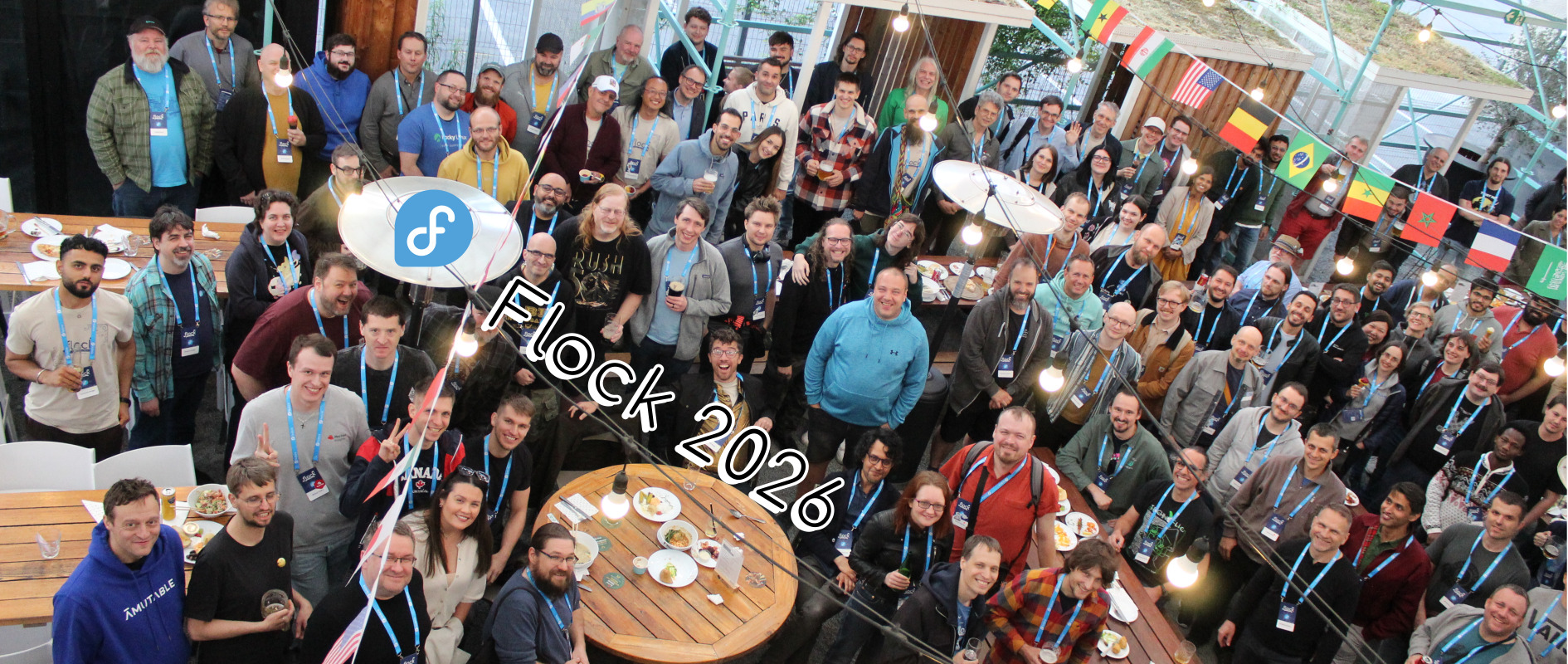
In the blink of an eye, it was over almost as quickly as it began. But the three days at the annual Flock to Fedora conference from 14–16 June 2026 in Prague, Czechia were packed with the kind of engagement that keeps the Fedora community going. Flock to Fedora, or often simply referred to as Flock, is the flagship contributor community event for the Fedora community. Flock is a place where the "doers" of our community gather annually to share our work, discuss ongoing collaborations, and shape the future of our next year ahead. Ultimately, it is one of my favorite parts of the Fedora Project. Being one of the lead organizers is one of the greatest privileges of serving in the Fedora Community Architect role at Red Hat.
This blog post is my attempt to capture the highlights of Flock 2026 while they are fresh in mind. The Linux and open source media already began their coverage. So, I thought this was a good moment to share my perspective on the event. This was my ninth Flock that I have attended and the fourth Flock where I played a leading role as an organizer.
|
Note
|
This is the first post in a three-part series on Flock to Fedora 2026. The second post covers how Flock gets organized behind the scenes. The third post shares my personal reflections on organizing Flock as Fedora Community Architect. |
I often tell people that the 45 days before Flock are some of the most stressful days of my entire year. But all four times I have done this, once I actually arrive at Flock and the conference gets going, the stress melts away. I am still running around a lot, taking care of this or that, but the important things always come together. Our speakers deliver great content, people reconnect after a long time of not seeing someone, and the hallway track is constantly lively. This year was no exception. I was pleasantly pleased to see and hear the community vibe which is essential to Flock was once again re-created.
Both my lived experience from nine years of Flock and the post-event data since we began collecting it in 2024 tells us one thing, absolutely. One of the most-valued parts of the Flock to Fedora experience is what is commonly known as "hallway track." If this is a new term to you, it is not too hard to understand. It plays on the idea that while there are usually tracks of speaker programming and content at a conference, there is also an unspoken track on the schedule. This "hallway track" is the informal conversations that take place outside of the speaker halls. They happen organically and they are usually unscripted. In-person attendees of Flock have been telling us for years that the "hallway track" at Flock is a critical, spotlight part of what makes the event worth attending.

So, while it appears the Fedora community has vast opinions about Flock, what it is, and what it is supposed to be, we all seem to agree on one thing. Getting the face-time to speak with other Fedora contributors is invaluable and drives critical engagement that keeps people in our community. I genuinely think without Flock to bring our core contributor community together once a year, we might all be burnt-out, exhausted, and tired from the online engagement we have been doing for more than 23 years. The in-person time is where the Fedora Friends Foundation comes out on full display. The hallway track is where people can go from colleagues to friends. When we talk about building trust in a community, it is experiences like the Flock to Fedora hallway track that turn trust-building from a concept to a concrete, practical thing.
One of the most poignant parts of Flock 2026 came in the "State of Fedora" keynote delivered by the Fedora Project Leader, Jef Spaleta. Several thoughts were put forward, but what clearly generated buzz was a graph produced by Michael Winters from the Fedora Data Working Group.

Michael single-handedly developed user-level access to the wealth of packaging data we have been working to analyze, and the result was a striking visualization of the number of unique package committers in Fedora over a six-year span. The graph shows what seems to be a significant decline of the number of unique packagers actually working in Fedora Linux over a six-year span. The data appears to indicate a sharp decline in the number of unique packagers in 2026 so far versus the unique packagers in 2020 and 2023. It is a graph that is certainly concerning.
Jef put forward theories of what he thought the data could be indicating. At one point, he mentioned the idea of generational switchover, and that one era is ending and a new one is beginning. In the session following his keynote, the Fedora Council Q&A, this topic of generational switchover came up even more. Obviously, people felt concerned or triggered in some sort of way by this data. While the Fedora Council originally planned for the panel to focus more on a "what/how" conversation, we ended up having more of a "why" conversation with attendees.
It was a comment made by Aleksandra Fedorova which really stuck with me. At one point, she and I had touched on a shared experience for an in-person F41 Release Party in Potsdam, Germany. The interesting part of this was the unique intersection of both the local organizer, René Kuhn, and newcomer, junior students from the university (i.e., where the event was held) and old-timer, experienced contributors like myself and Aleksandra. Aleksandra mentioned that her experience at this F41 Release Party reminded her that the young people and students of today were just like many of us with several years behind us were when we began in Free Software and Open Source. She said that it was not actually young people who were changing, but us, the people who had been here for years, who have changed. We are no longer the same young people we were. We are more experienced, more exhausted, perhaps more burnt-out, than we were in our own youth and entry to the Free Software movement. I encourage you to watch the full panel discussion once it is available, but this is a thought that is sticking with me after Flock ended.
We had a record-breaking level of engagement on the sponsor side of Flock 2026. We raised more sponsorship funding from a larger number of unique sponsors than we have received in years. This milestone shows us a couple of things:
We have a diverse group of engaged sponsors, mostly from downstream products and companies, which care about the sustainability and well-being of Fedora.
We are growing the amount of sponsorship for Flock to Fedora, which can enable us to think on a bigger, grander scale for future editions.
Our processes are getting better at selling Flock sponsor packages, and processing contracts, purchase orders, and invoices.
The sponsorship side of Flock really became more critical after the COVID-19 pandemic, when we returned to Flock to Fedora after a few years of Nest with Fedora virtual conferences. I remember as an attendee from 2015 to 2019 that while there were other sponsors, it was obviously Red Hat who was the most engaged, the most committed, and the one footing most of the actual costs. To be honest, this is still true today. However, the pool of engaged sponsors is diversifying. We have more commercial downstreams from Fedora Linux than we have ever had at any point in our history. To me, this represents healthy growth, even if it does raise more questions about how to sustain that growth and balance the increasing interest in Fedora Linux in a fair and equitable way.
Everyone tries to influence the direction of a project they care about. That is simply how communities work. What matters is whether the processes for exerting that influence are fair, equitable, and open to everyone. In Fedora, they are. Our sponsors do not buy influence in Fedora Linux. What is impressive about most of our Flock sponsors is that there are often coordinated groups of paid engineers and contributors from these companies who show up to do real, actual work in the Fedora community. They submit Fedora Changes, get them reviewed by FESCo, and integrated into Fedora Linux — the same process available to anyone. Our hardware vendor sponsors can also participate in initiatives like Fedora Ready, to provide greater assurance and information for Linux consumers to purchase hardware which has a guaranteed quality experience with Fedora Linux. Our sponsors are not complacent and they do not rely on financial sponsorship to get them special favors. If they want something done, they show up and do the work themselves, together with the input and participation of the rest of the community.
A special thank-you to the individual folks at our various sponsoring organizations who raise the Fedora Project flag in their teams, departments, and entire organization. Without you, these special, collaborative relationships we have would not be possible.
If you are reading this blog post, attended Flock in-person or virtually, and it is before 8 July 2026, stop everything you are doing. Go and complete the Flock 2026 post-event survey right now. This is only because it is the most important part of the entire future Flock planning process. As one of the people with access to the data and also involved with the planning for future Flock editions, nothing else matters more than this. While I am always listening to what people have to say in the hallway or making my own observations at the conference, the survey gives us real data to understand what people think and feel about Flock to Fedora. I always read every single comment and response in the survey. It matters to the entire Flock organizing team that we build an event that reflects the desires and wishes of our community.
The survey is open to both in-person and virtual attendees. We know that the Fedora community is global and spread out all over the world. We also know that travel is not necessarily an equitable act; not everyone can afford to travel, or even is physically able to travel. Therefore, we invite everyone who considers themselves a part of the Fedora community and participating with Flock to share their opinions.
After all, if we only sent our survey to our in-person European conference attendees, it seems quite likely that we will keep hearing about how Europe is the best location for Flock. So, even our virtual attendees and people who could not travel in-person to Flock 2026 can share their feedback and voice to help us make a better and more inclusive Flock in the next editions.
This post covered the highlights of what happened at Flock 2026. But there is more to say about how Flock gets organized and what the experience means on a personal level.
How Flock to Fedora gets organized: A look behind the scenes at the team, the workflow, and the paperwork that goes into producing Flock.
Reflections on organizing Flock as Fedora Community Architect: What organizing Flock has taught me about community, inclusion, and the future of the event.
admin )
on 2026-06-26 10:00:00 UTC
This is a report created by CLE Team, which is a team containing community members working in various Fedora groups for example Infrastructure, Release Engineering, Quality etc. This team is also moving forward some initiatives inside Fedora project.
Week: 22 – 26 June 2026
This team is taking care of day to day business regarding Fedora Infrastructure.
It’s responsible for services running in Fedora infrastructure.
Ticket tracker
This team is taking care of day to day business regarding CentOS Infrastructure and CentOS Stream Infrastructure.
It’s responsible for services running in CentOS Infrastructure and CentOS Stream.
CentOS ticket tracker
CentOS Stream ticket tracker
This is the summary of the work done regarding the RISC-V architecture in Fedora.
This is the summary of the work done regarding AI in Fedora.
This team is taking care of quality of Fedora. Maintaining CI, organizing test days
and keeping an eye on overall quality of Fedora releases.
This team is working on introduction of https://forge.fedoraproject.org to Fedora
and migration of repositories from pagure.io.
This team is working on improving User experience. Providing artwork, user experience,
usability, and general design services to the Fedora project
If you have any questions or feedback, please respond to this report or contact us on #admin:fedoraproject.org channel on matrix.
The post Community Update – Week 26 2026 appeared first on Fedora Community Blog.
admin )
on 2026-06-26 09:19:27 UTC
Updates to translations of Fedora Documentation are again available. As announced on March 3rd, the unavailability of translation updates was due to the migration of the translation repositories and necessary tools from Pagure to the Fedora Forge. It took longer than expected but we are pleased to report this undertaking came finally to the end.
The post Fedora Documentation translations again available appeared first on Fedora Community Blog.
admin )
on 2026-06-25 20:00:00 UTC
We will be reinstalling the virthost that runs download-ib01, torrent.fedoraproject.org and fedorapeople.org. During the outage these sites will be down.
admin )
on 2026-06-25 10:18:38 UTC
On Saturday May 30th 2026, the XV edition of P.I.W.O. Poznań Free Software Fest was held in Poznań,  Poland.
P.I.W.O. is an event with a long history. Between 2004 and 2018, it was organized by various student associations at the Poznań University of Technology. After 2018’s XIII edition (superstition much?), it entered a long hiatus that lasted until 2025, when members of the newly-formed Knyfyrtel Poznań Hackerspace decided to bring it back. The reactivated event proved a huge success, with the XIV edition bringing in 197 attendees. As such, ambitions for 2026 were rather big.
This year’s edition was the result of combined efforts of three Poznań-based organizations:

Thanks to Webrains, for the first time in its history, the event was held at the Adam Mickiewicz University in Poznań – namely, the uni’s Faculty of Mathematics and Computer Science. Also a historical first, the XV edition was granted honorary patronage by the President of Poznań City Council.
The event spanned almost the entire Saturday, opening at 9:30 am and closing at 7:35 pm. The agenda was tightly packed, featuring 3 lecture tracks with 24 talks, 2 workshop tracks with 8 activities, plus a LAN Party track with 3 tournaments, as well as “free play” sessions. There was also a quiet corner where, thanks to the “Honte” group, attendees could relax and learn to play Go.


Throughout the years, one of P.I.W.O.’s hallmarks was the lunch break, with the attendees being provided free pizza. This year couldn’t be any different, with some 66m² (or 710 ft²) of pizza being delivered to the venue. (It disappeared frighteningly quick.)


The Fedora Community was represented by:

This year’s P.I.W.O. served as an opportunity to announce the creation of SPOIWO – Sojusz Przyjaciół Otwartego i Wolnego Oprogramowania (Alliance of Friends of Open and Free Software). This diverse coalition of social and technology organisations, cooperatives and open source businesses signed a declaration in support of digital sovereignty. The alliance was formed in response to the ever-deepening of public institutions’ dependency on closed platforms and their loss of control over data and communication.

The signing ceremony also featured speeches by representatives of SUSE Poland, Polish Linux User Group, “Internet. Czas działać!” Foundation and PLZ Spółdzielnia.
The event wrapped with 452 attendee badges issued, which exceeded even the most daring of expectations. (The number also explains why the pizza disappeared so quick.) The bar for the next edition is set high, but so are the organizing team’s ambitions.


If you’d like to learn more about the event, watch the live stream recordings, or subscribe to news so you won’t miss the announcement for the XVI edition – you can do all of that on the event’s website, at piwo.sh.
The post Fedora at XV P.I.W.O. Poznań Free Software Fest appeared first on Fedora Community Blog.
admin )
on 2026-06-25 09:30:00 UTC
Some hosts are being relocated and have been taken down for that purpose. OCP workers 04 and 05 are on the list.
While this should have been transparent to end users, it has caused unforseen consequences with the Apache LoadBalancer setup for Openshift Apps, when requests mistakenly get sent to …